AI Character Consistency with Multi-Image Reference
Create consistent characters across every scene with AI multi-image reference. Perfect for authors, comic artists, and game developers. Learn the workflow!
Every storyteller knows the heartbreak: your protagonist looks like a determined warrior in chapter one, then transforms into a completely different person by chapter three. Maybe the jawline softens, the eye color shifts, or the style of their armor changes inexplicably. For authors creating book illustrations, comic artists developing consistent characters, and game designers building visual assets, this isn’t just frustrating—it can break your audience’s immersion and shatter the narrative world you’ve worked so hard to build.
Character consistency has long been the holy grail of visual storytelling. Traditional solutions cost thousands in commission fees or require years of artistic training. But what if you could maintain perfect AI character consistency across dozens of scenes—without drawing a single stroke? Enter multi-image reference, a game-changing capability that lets you train AI on your character’s unique traits and generate them in any pose, setting, or emotional state. Let’s walk through how this transforms the creative workflow for storytellers everywhere.
Why Character Consistency Matters for Visual Storytelling
Before diving into the technical workflow, let’s explore why AI character consistency matters so much for your medium. Whether you’re creating a webtoon, illustrating your KDP book, or developing character assets for a game, your audience forms an emotional bond through visual recognition. When a character’s appearance shifts between scenes—even subtly—it creates cognitive dissonance. Readers subconsciously pause, wondering if this is the same person they connected with earlier.
For comic creators and webtoon artists, this consistency is especially critical. Your readers might view hundreds of panels featuring your protagonist. Inconsistent features become glaringly obvious across that many exposures. Book illustrators face a different challenge: you might generate character scenes in different orders as your story evolves, making it difficult to manually match facial structures and styling later. Game developers need character assets that work across multiple angles, expressions, and contexts while remaining unmistakably the same character.
The pain point is universal: you need a character reference shot that anchors your visual identity, then a way to reproduce that identity reliably across new scenarios. That’s exactly what multi-image reference solves.
What Is Multi-Image Reference?
Multi-image reference is an advanced AI capability that goes beyond single-image prompting. Instead of describing your character in text and hoping for the best, you upload multiple reference images showing your character from different angles or in different contexts. The AI analyzes these images to understand your character’s defining traits: facial structure, eye shape, hair texture and color, body proportions, clothing style, and even subtle details like the curve of a smile or the arch of an eyebrow.
Think of it like giving an AI artist a character design sheet instead of a verbal description. When you say “generate this character in a forest scene,” the AI doesn’t guess—it draws from the visual knowledge it extracted from your reference images. This is particularly powerful for:
- Authors: Maintain consistent book illustrations across your entire series
- Comic creators: Keep webtoon characters recognizable panel after panel
- Game developers: Generate character assets from multiple angles while preserving identity
- Storyboard artists: Explore scene variations without losing character fidelity
The key advantage? Once you’ve established your character reference, you can generate consistent character scenes in new environments, poses, and emotional states—saving hours of manual drawing or expensive commissions.
Creating Your Character Reference Shot
Your journey to consistent characters begins with a quality reference shot. This initial image serves as the foundation for all subsequent generations, so it’s worth getting right. Here’s how to create a character reference shot that gives the AI everything it needs.
Start by generating or uploading your base character image. Focus on clarity: a well-lit, forward-facing portrait typically works best for establishing core features. The image should capture:
- Facial structure: Jawline, nose shape, eye spacing, and forehead proportions
- Hair details: Color, texture, and style quirks (cowlicks, parting, etc.)
- Distinguishing features: Scars, freckles, jewelry, or accessories that make your character unique
- Base outfit: Clothing style and color palette (you can modify this later, but the AI needs a starting point)
See screenshot-01-fill_form.png above for an example of how to input your character prompt and upload your initial reference image. The form allows you to describe your character while providing visual guidance, ensuring the AI understands both your text description AND the visual traits you want preserved.
Once generated, review generated-01-fill_form-00.png to confirm your character looks exactly as intended. This is your anchor image—the visual DNA that will maintain consistency across all future scenes.
Building Your Multi-Image Reference Library
Here’s where the magic happens. A single reference image is good, but multiple references make your character consistency bulletproof. By providing 2-4 additional images showing your character from different angles or in varied contexts, you help the AI build a complete understanding of your character’s three-dimensional appearance.
Recommended reference variations:
- Side profile: Shows nose shape, jawline from alternate angle, hair depth
- Three-quarter view: Demonstrates how features shift at slight angles
- Different expression: Captures how the face changes when smiling vs. neutral
- Alternate outfit: Proves consistency isn’t just about clothing (optional but helpful)
As shown in screenshot-02-fill_form.png, the multi-image reference interface lets you upload multiple character images simultaneously. Each uploaded image teaches the AI something new about how your character looks from different perspectives.
When you generate from this multi-image reference library, like in generated-02-fill_form-00.png, you’ll notice the AI has learned your character’s features from all angles. The resulting image maintains perfect character fidelity even in a new pose or context. This is the foundation for creating consistent character scenes throughout your entire project.
Generating Consistent Character Scenes Across Contexts
Now that your character reference is established, the real creative freedom begins. You can place your character in any scene, any setting, any situation—and they will remain recognizably themselves. This is where visual storytelling truly accelerates.
Scene Generation Workflow:
- Describe your new context: “in a dark forest at night, holding a glowing lantern”
- Select your multi-image reference: The AI knows your character’s face
- Specify the action: “looking forward with determination”
- Generate: Your character appears in the new scene, perfectly consistent
Screenshot-03-fill_form.png demonstrates this process—notice how the scene description changes while the character reference remains active. The AI understands it needs to place YOUR character into this new environment, not generate a generic person.
The result in generated-03-fill_form-00.png shows your character seamlessly integrated into the forest scene. Same facial structure, same hair, same identifying features—now in a completely new context. This workflow works for any scene: battle scenes, quiet moments, urban settings, fantasy landscapes, or intimate character interactions.
For comic creators, this means generating panel after panel without manually redrawing your protagonist. For authors, it’s creating book illustrations where Chapter 1’s hero is unmistakably the same person as Chapter 20’s. For game developers, it’s generating character assets across different environments while preserving visual identity.
Advanced Techniques: Emotions, Actions, and Interactions
Once you’ve mastered basic scene consistency, you can push the AI character consistency further by exploring emotional range, dynamic actions, and character interactions—all while maintaining visual fidelity.
Emotional Consistency: Your character should look like themselves whether they’re angry, joyful, fearful, or contemplative. The multi-image reference captures facial structure so deeply that emotional expressions transform the SAME face rather than replacing it with a different person. Screenshot-04-fill_form.png shows an emotional prompt being applied to your established character.
As you can see in generated-04-fill_form-00.png, the emotion comes through while every defining feature—eye shape, nose structure, hair pattern—remains intact. This is crucial for storytelling: readers need to recognize the character even in extreme emotional moments.
Action Poses: Generate your character running, jumping, fighting, or resting. The AI maintains proportions and identifying features even in dynamic poses that would traditionally require anatomical expertise to draw correctly.
Character Interactions: Place multiple consistent characters in the same scene. Establish separate reference libraries for each main character, then generate scenes showing them together. Screenshot-05-fill_form.png and generated-05-fill_form-00.png demonstrate how two characters with distinct reference images can interact while each maintains their individual identity.
This opens enormous possibilities for comic panels, book covers, and promotional materials where multiple key characters appear together.
Scaling Production: From Single Scenes to Full Story Arcs
The true power of multi-image reference reveals itself when you’re producing at scale. Imagine creating a 20-chapter book with 3 illustrations per chapter, or a webtoon with 150 panels per episode. Traditional methods become bottlenecks; AI character consistency becomes your production engine.
Production Tips for Large Projects:
- Save your character reference library: Export and label your reference images clearly. Organize by character name and project so you can return weeks later and maintain perfect consistency.
- Create style guides: Document which prompts generate your favorite results. This helps when you’re generating scenes in batches and need uniformity across different generation sessions.
- Batch similar scenes: Generate all your forest scenes, then all your interior scenes, then all your battle scenes. Working in batches helps you maintain consistency in lighting and environmental treatment.
- Version control: If you experiment with an evolved character design (perhaps they age across your story), save separate reference libraries for each version.
Screenshots through the workflow—screenshot-06-fill_form.png showing a later-generation scene, and generated-06-fill_form-00.png showing the final result—demonstrate how your character remains recognizable even after multiple generation steps and scene variations.
This scalability is what makes AI visual storytelling transformative for indie creators. What once required a team of artists or months of work can now be accomplished by one person with a vision and the right AI tools.
Best Practices for Flawless Character Consistency
Based on successful workflows from comic artists, authors, and game developers, here are proven best practices for achieving reliable AI character consistency:
Quality Over Quantity: 3-5 excellent reference images outperform 10 mediocre ones. Each reference should be clear, well-lit, and focused on your character’s face.
Consistent Base Style: If your reference images mix photo-realism, anime, and painterly styles, the AI will struggle. Establish your visual style first, then create references within that style.
Clothing Considerations: If your character’s outfit changes significantly across your story, focus references on facial features. You can describe clothing changes in prompts without breaking character consistency.
Test Before Committing: Generate a few test scenes with your reference library before committing to a large production. If you notice features shifting, refine your references with clearer images.
Iterative Refinement: Don’t be afraid to add new reference images if you notice specific features aren’t carrying through consistently. Each new image teaches the AI more about your character.
Backup Everything: Save your reference images, your successful prompts, and your favorite generations. These assets are valuable for future projects or sequels.
Following these practices ensures your character consistency workflow produces professional results that rival hand-drawn art—at a fraction of the time and cost.
Step-by-Step Tutorial
In this tutorial, you’ll learn how to create a cohesive cast of characters with consistent visual styling across multiple scenes using ImageFix’s multi-image reference tools. Perfect for children’s book illustrators, comic artists, and brand storytellers who need characters to remain recognizable and consistent across different settings.
What You’ll Need
- An ImageFix account with access to AI generation tools
- Basic understanding of prompt writing
- A clear concept for your character cast and the scenes they’ll appear in
- Familiarity with the ImageFix dashboard interface
Step 1: Generate Your First Character on White Background
Navigate to the AI Generate tool in the dashboard. Select the bytedance/seedream-4.5 model and enter the following prompt to create your first character:
“Whimsical fantasy children’s book illustration with soft watercolor textures and warm lighting. A young elf child with shoulder-length shimmering silver hair, pointed ears, and intricate glowing blue rune tattoos covering arms and cheeks, wearing simple forest-green tunic, standing on white background with gentle smile and curious expression.”
The white background is crucial for easy extraction and reuse. Click Generate and wait for the result.
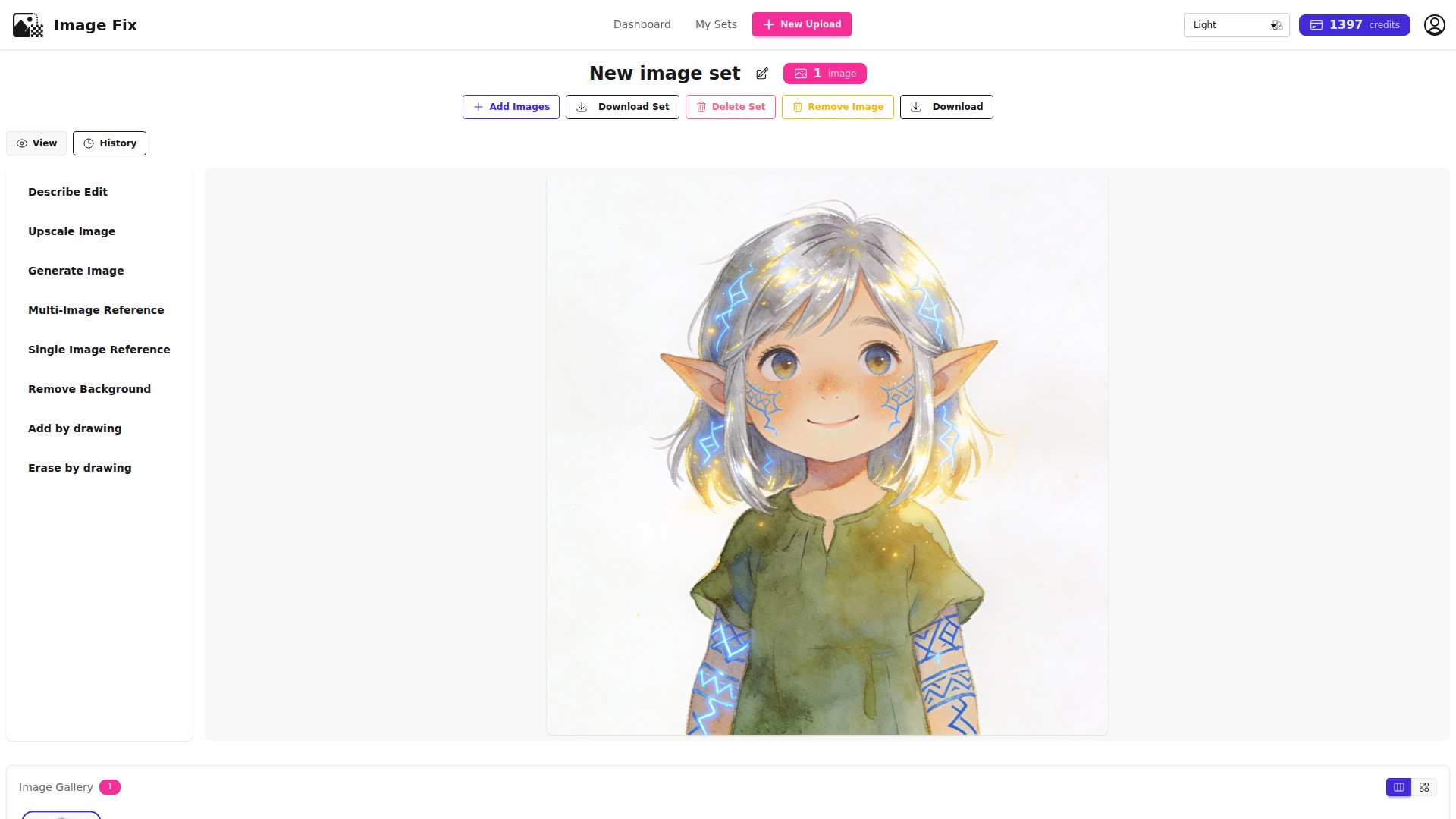
Tip: Create your main character first on a plain background—this makes it much easier to reuse the character in later compositions without background elements interfering.
Step 2: Create a Supporting Character with Matching Style
Use the AI Describe Edit tool with the first character image as reference. Enter this prompt while maintaining the exact illustration style:
“Maintain the exact illustration style of the reference image. Create an ancient tree-ent sage with bark-like skin covered in moss, a magnificent flowing mossy beard, wise amber eyes that twinkle with knowledge, branch-like fingers with small leaves, wearing robes woven from vines and leaves, white background.”
Upload your first character’s image as the reference, then click Generate.
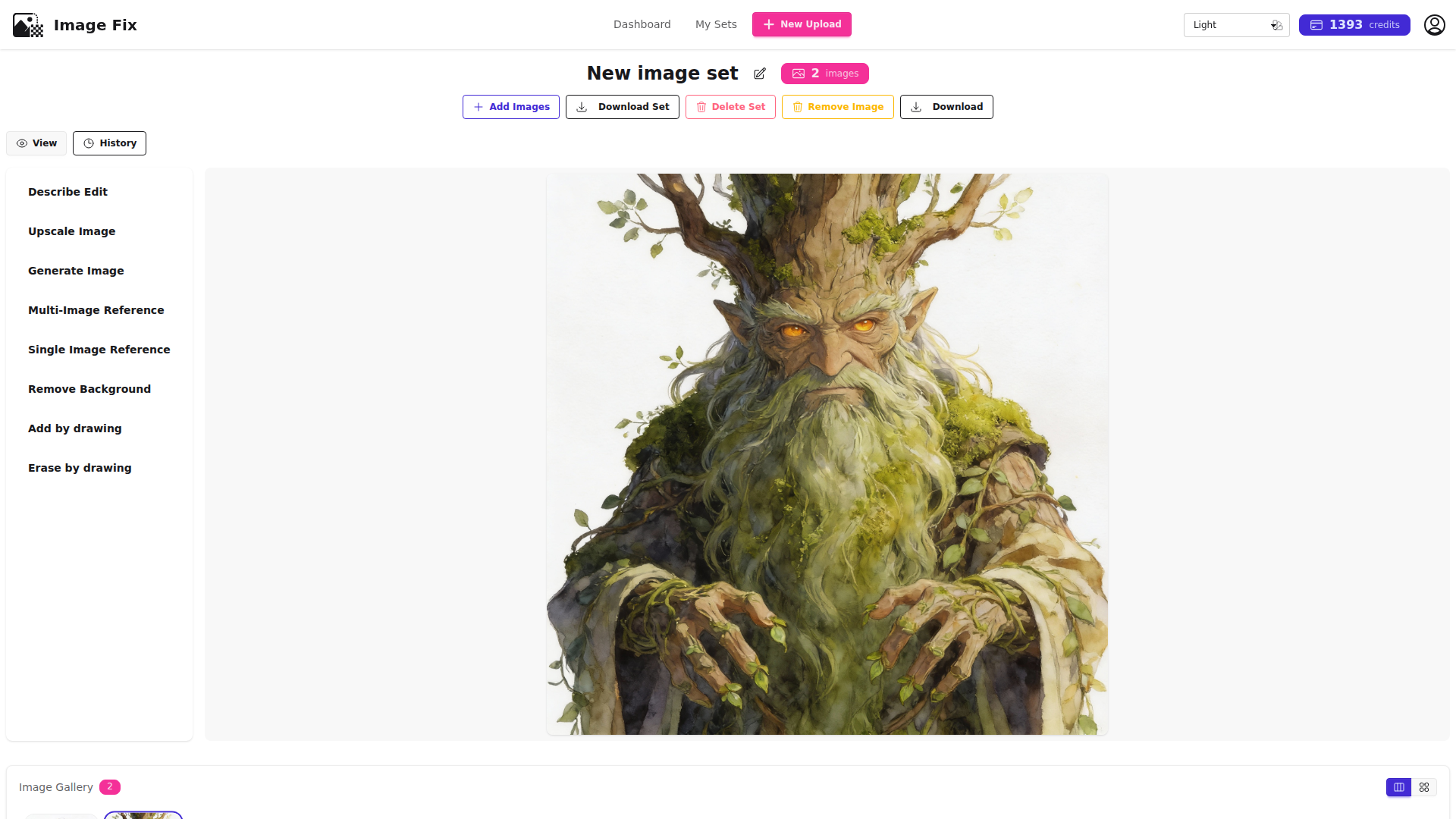
Tip: Using ‘Maintain the exact illustration style of the reference image’ ensures consistent art direction across all your characters.
Step 3: Add a Third Character to Your Cast
Create your third character using AI Describe Edit with the first character as style reference. Enter:
“Maintain the exact illustration style of the reference image. Create a tiny fire spirit, small enough to fit in palm, composed entirely of dancing orange and yellow flames with a bright core, curious facial features formed by flickering flames, friendly expression, white background.”
Generate this image to complete your character trio, all with matching watercolor fantasy style.
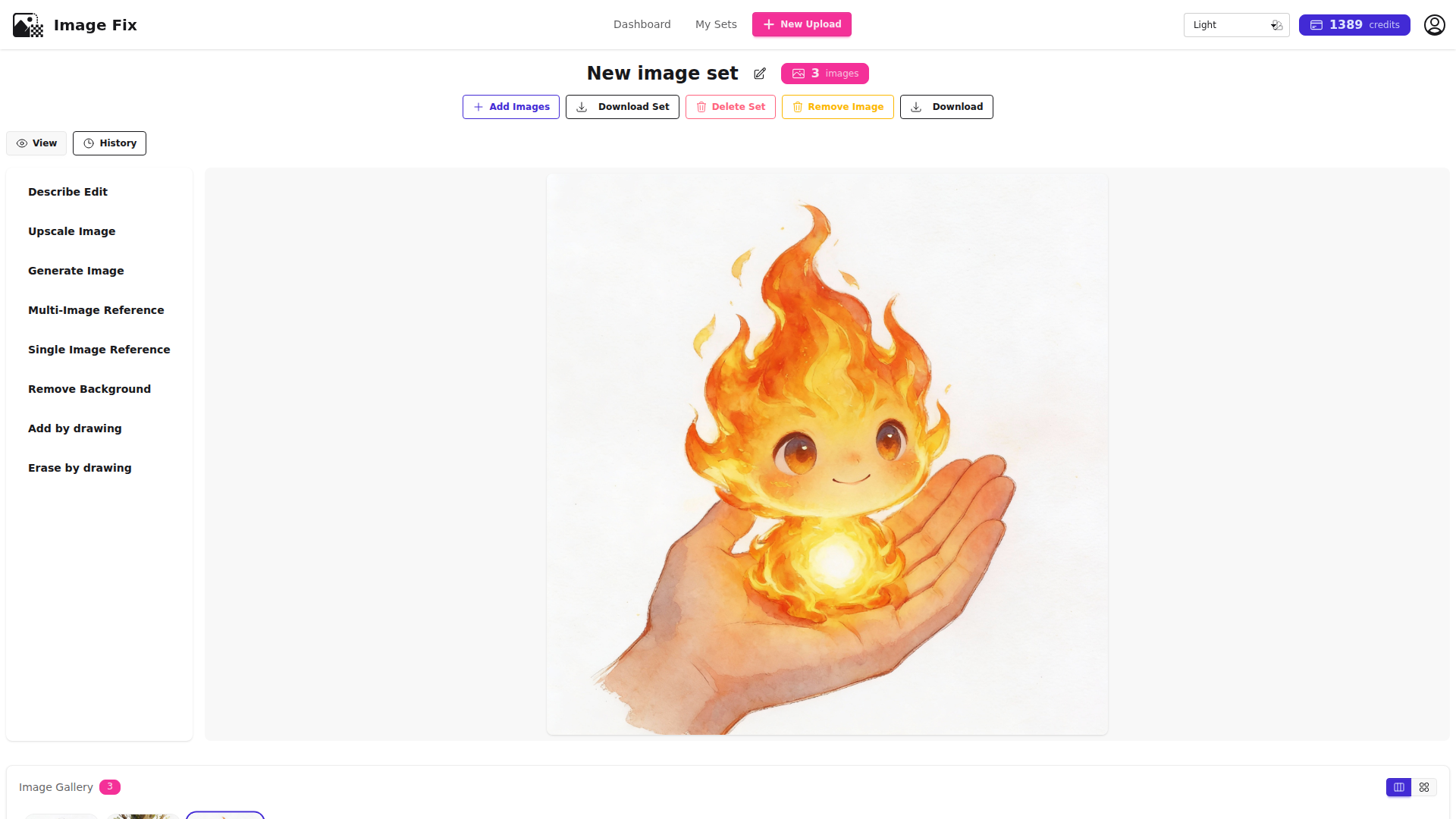
Tip: Keep all characters on white backgrounds initially—it gives you maximum flexibility when composing scenes later.
Step 4: Compose Your First Multi-Character Scene
Use the AI Multi-Image Reference tool and upload images from Steps 1 and 3 (elf child and fire spirit). Enter this scene prompt:
“A young elf child with shimmering silver hair and glowing blue rune tattoos crouches beside a crystalline pond in an enchanted forest clearing. The elf reaches toward a large glowing crystal where a tiny fire spirit composed of orange and yellow flames peeks out curiously. The elf looks amazed and delighted. Maintain the exact illustration style of the reference images.”
Generate to see your characters together in a scene for the first time.
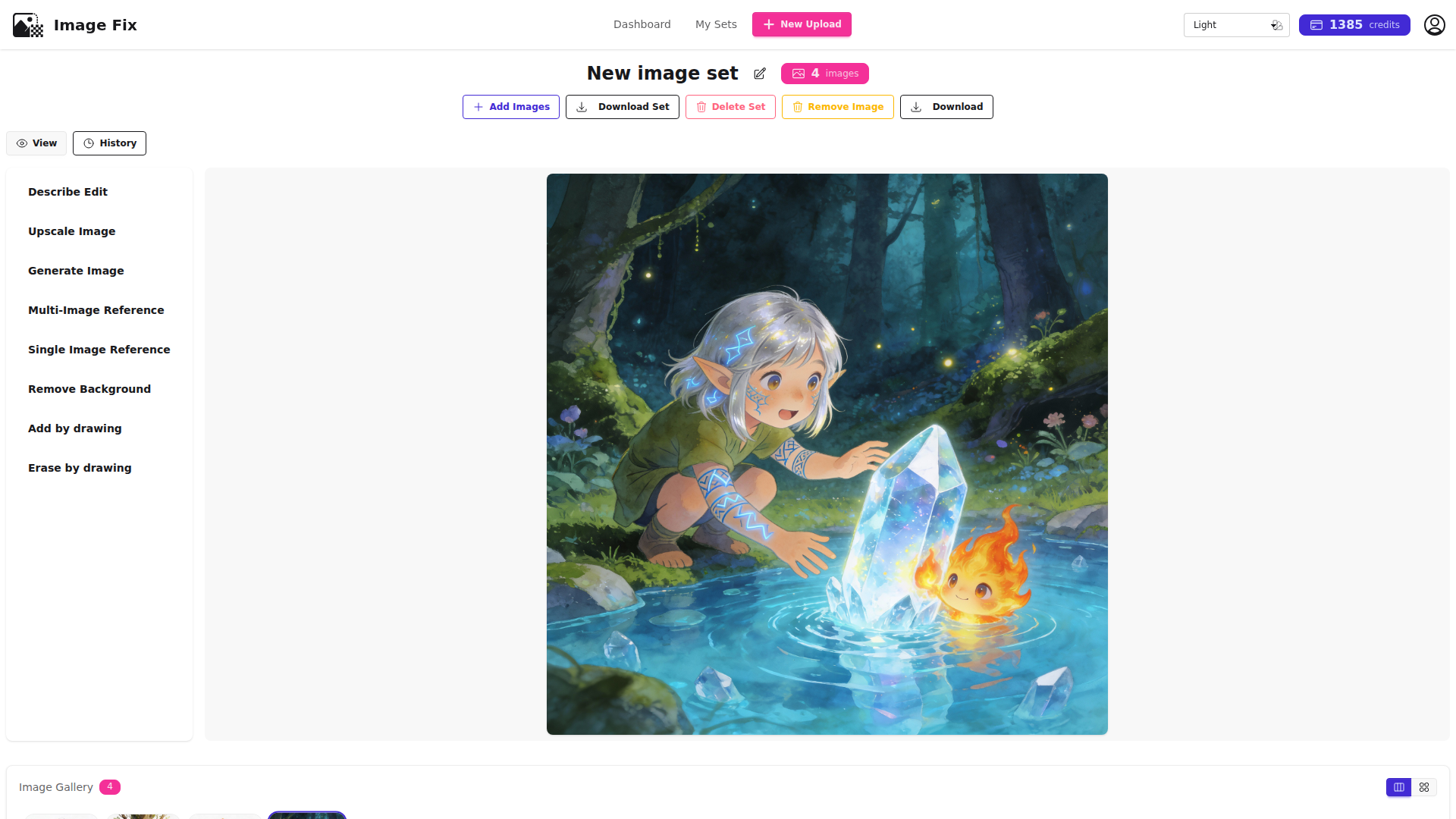
Tip: The multi-image reference tool ensures both character appearance and art style remain consistent when placing characters together.
Step 5: Create an Indoor Scene with Different Character Pair
Use AI Multi-Image Reference with images from Steps 1 and 2 (elf child and tree-ent). Enter:
“Inside an ancient library hollowed within a giant tree trunk, an ancient tree-ent sage with mossy beard and wise amber eyes gently gestures toward an open glowing magical tome floating in air. A young elf child with silver hair and blue rune tattoos sits attentively on a mushroom stool, studying the book with concentration. Warm magical light illuminates their faces. Maintain the exact illustration style of the reference images.”
Generate to create a cozy learning scene.
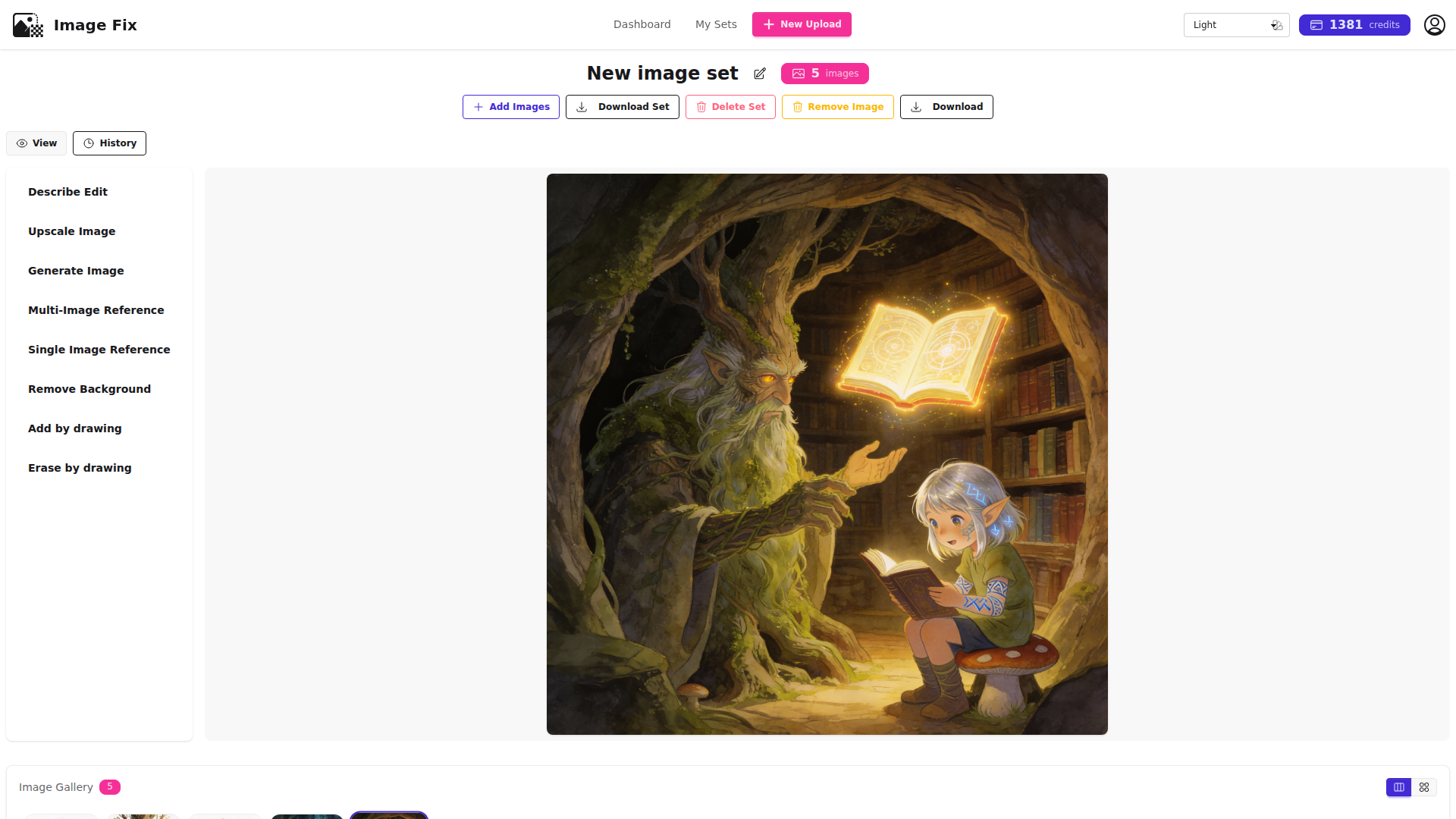
Tip: You can mix and match different character combinations for various scenes while maintaining total consistency.
Step 6: Build a Group Scene with All Characters
Use AI Multi-Image Reference with all three character images (Steps 1, 2, and 3). Enter this climactic scene prompt:
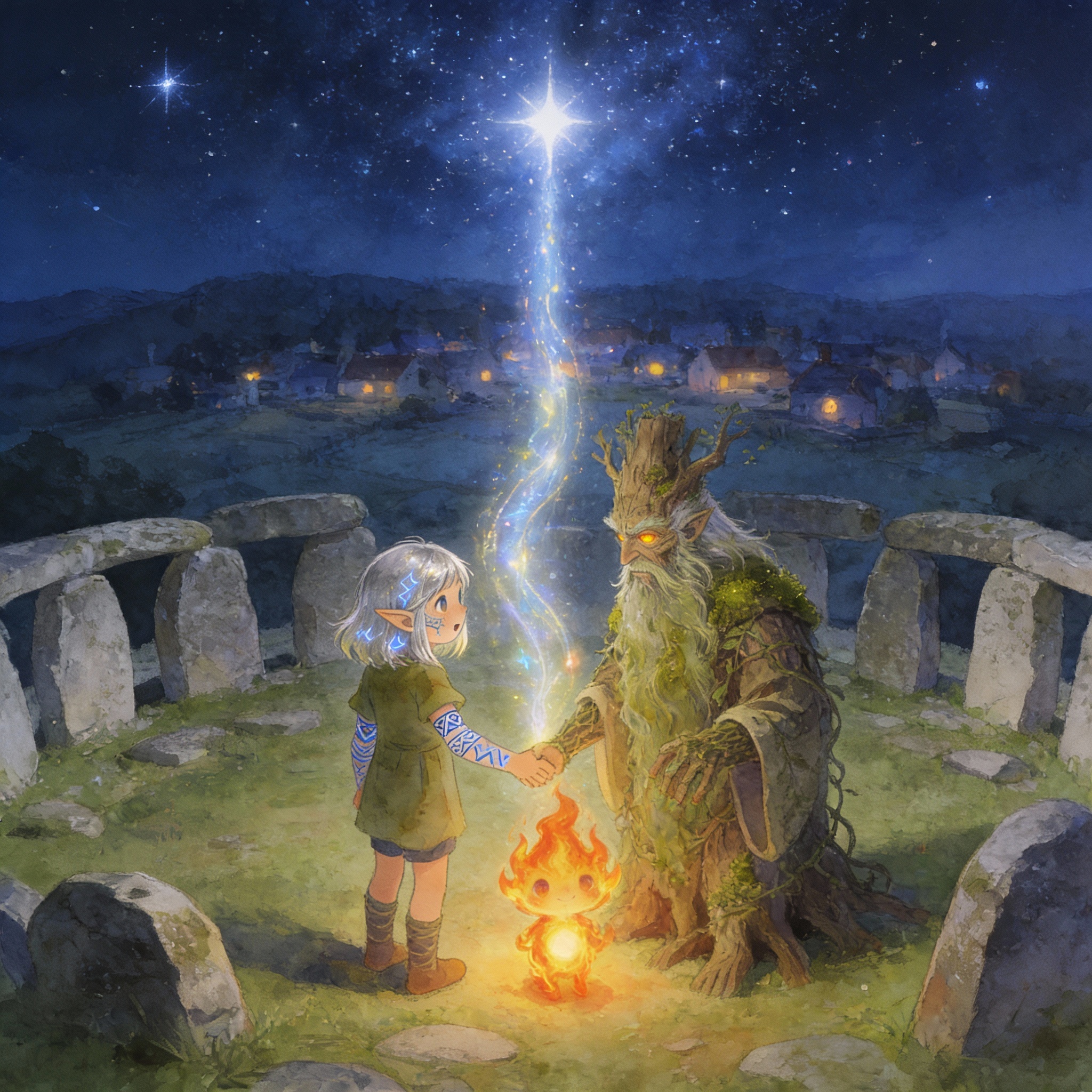
“Beneath a starlit sky at an ancient stone circle, a young elf with silver hair and blue rune tattoos, an ancient tree-ent with mossy beard and amber eyes, and a tiny fire spirit of orange flames stand together holding hands. They cast a shimmering protective spell that rises toward a peaceful sleeping village visible in distance. Magical energy flows between them. Maintain the exact illustration style of the reference images.”
Generate to see your complete character cast in an epic moment together.
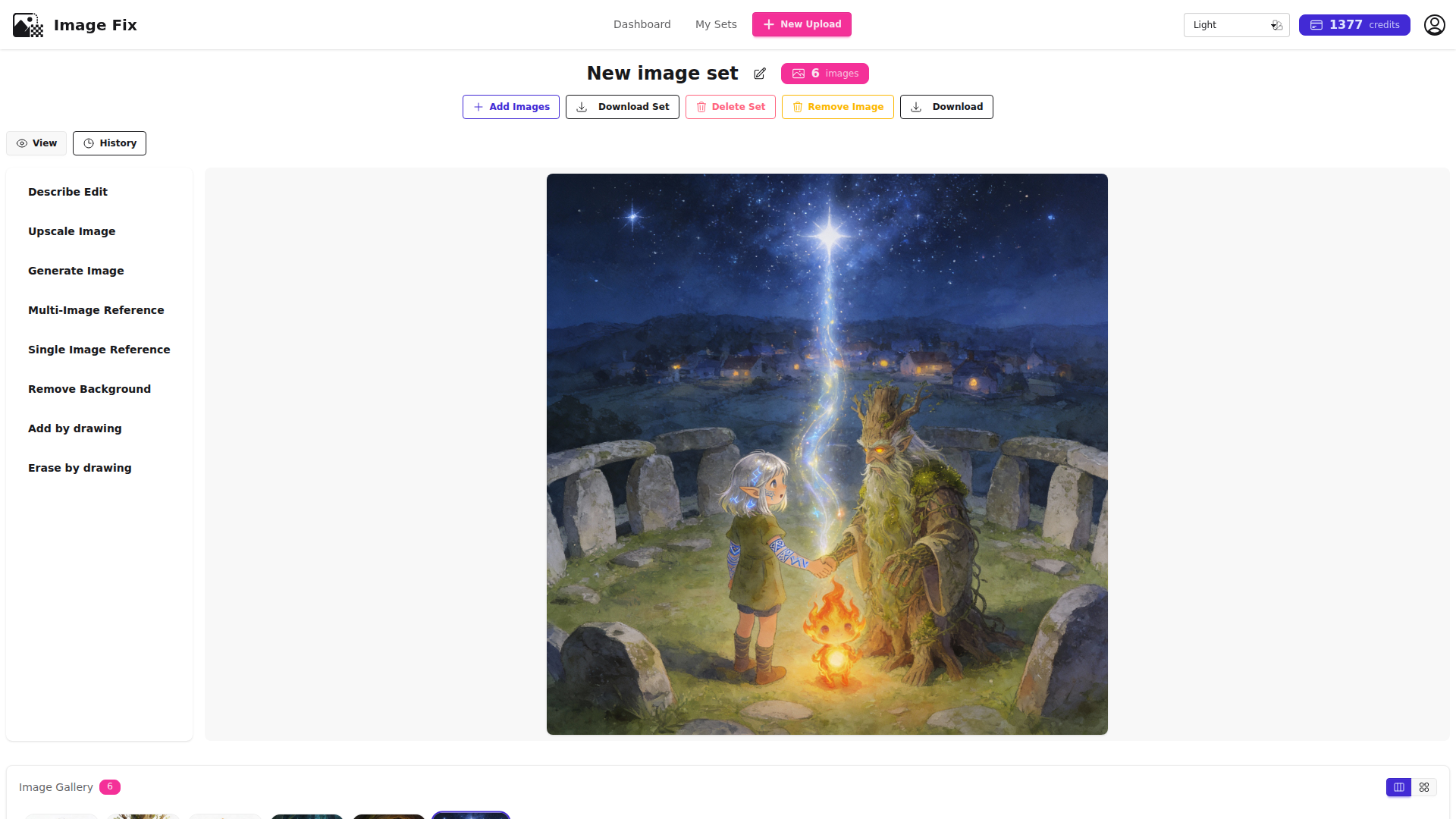
Tip: For group scenes, specify relationships between characters (holding hands, standing together) to ensure natural composition.
What’s Next
Now that you have a consistent character cast, try creating a longer narrative sequence with 4-6 storyboard panels showing a complete story arc. Experiment with different environmental settings (underwater, mountaintop, desert) to test how your characters translate across varied backgrounds, or explore adding props and magical elements that maintain the same watercolor aesthetic.
Troubleshooting
Characters don’t look consistent across scenes
Always use ‘Maintain the exact illustration style of the reference images’ in your scene prompts. Reference the original character images (Steps 1-3) rather than previously generated scenes to avoid style drift.
Background elements from character images appear in scenes
Ensure your initial character prompts all include ‘white background’ and avoid complex background elements. This keeps characters clean and reusable.
Character proportions change between images
When using multi-image reference, upload all relevant character images for that scene. The AI needs to see all characters together to maintain proper relative sizing and proportions.
Generated scenes look too different from your art style
Reference the original isolated character images rather than previous scene compositions. Scenes accumulate complexity that can distract from the core style reference.
Frequently Asked Questions
How many reference images do I need for consistent AI characters?
For solid character consistency, 3-5 reference images work best. Include at least one front-facing portrait, one side profile, and one three-quarter view showing different angles. This helps the AI understand your character’s 3D structure and maintains features across poses.
Can I use multi-image reference for comic and webtoon character consistency?
Absolutely! Multi-image reference is ideal for comic character consistency and webtoon production. Once you establish your character reference library, you can generate panel after panel with your protagonist looking identical—saving hours of manual drawing while maintaining professional visual quality.
Will my character look the same in different scenes and outfits?
Yes! When you use multi-image reference, the AI learns your character’s facial structure and defining features. You can describe different outfits, settings, and actions in your prompts, and your character’s core appearance remains consistent. The reference focuses on face and body structure while allowing scene-specific changes.
How do book authors use AI character consistency across illustrations?
Authors create a reference library for each main character, then generate consistent book illustrations across chapters. Whether you need your hero in a castle, forest, or throne room, the multi-image reference ensures they look identical in every scene—perfect for series continuity and reader recognition.
What makes a good character reference shot for AI generation?
A good character reference shot is clear, well-lit, and shows defining features prominently. Front-facing portraits work best for establishing facial structure, while side profiles and three-quarter views help the AI understand depth. Ensure consistent art style across all reference images for best results.
Can game developers use this workflow for character asset generation?
Game developers can use multi-image reference to generate consistent character assets across different contexts, angles, and actions. This is especially valuable for indie developers creating character portraits, promotional materials, or exploring character variations while maintaining visual identity throughout the game.
Ready to create consistent characters that bring your stories to life? Try ImageFix’s multi-image reference workflow today—upload your character references, generate scenes in any setting, and maintain perfect consistency across your entire visual narrative. Get started for free and see the difference reliable AI character consistency makes in your creative workflow!