How to Make Handmade Soap Photos Stand Out on Etsy
Create rustic handmade soap photography for Etsy with AI. Turn craft-table soap snapshots into Pinterest-ready product images.
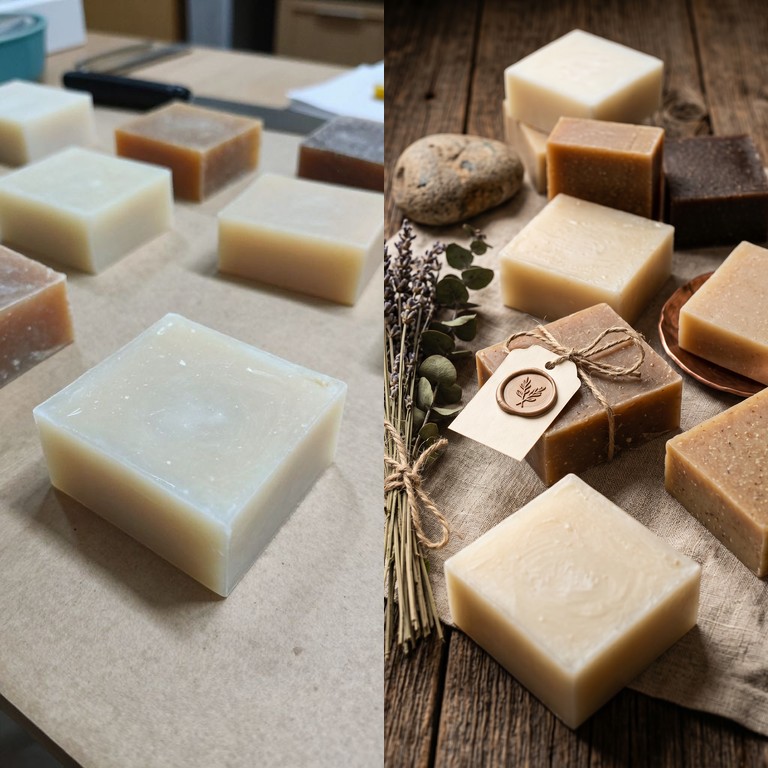
If you sell handmade soap on Etsy, your photos have to communicate things a buyer cannot touch through the screen: texture, scent, quality, care, and whether the bars feel giftable. A plain craft-table photo can show the soap clearly, but it often does not show the story behind it.
That matters because soap is visual before it is practical. Buyers notice the swirl, speckles, cut edges, botanicals, packaging, and overall mood long before they read every ingredient or scent note.
For this example, I used the ImageFix Marketing Image blueprint to turn one simple handmade soap photo into a rustic, Pinterest-friendly marketing image. The goal is not to invent a different product. The goal is to keep the same soap bars and make the scene feel more intentional for an Etsy listing, social post, or product pin.
Why handmade soap photography matters
Handmade soap buyers are looking for trust signals. They want the product to feel clean, thoughtful, and crafted by a real maker. A good photo can help communicate that without overexplaining.
The challenge is that handmade products are often photographed in the same place they are made: on a work table, counter, drying rack, or packing surface. That is practical, but it can make the final product look unfinished. A buyer may see the table, shadows, clutter, or rough lighting before they notice the actual soap.
Strong soap product photography does three jobs:
- It shows the texture and shape of the bars clearly.
- It gives scent and ingredient cues through props and styling.
- It makes the product feel ready to buy, gift, or save for later.
For this post, I chose a vertical Pinterest Pin 2:3 image because handmade soap performs well as visual inspiration. A tall composition gives the soap room to sit with linen, dried botanicals, natural textures, and giftable styling without feeling cramped.
The old way: styling a handmade soap photo
Traditional soap photography can be beautiful, but it takes setup:
- A rustic surface that fits the brand
- Linen, paper, or cloth that looks natural but not messy
- Dried herbs, flowers, tags, twine, bowls, trays, or wood props
- Soft light that does not flatten the soap texture
- Careful placement so the bars still look like the main subject
- Editing time for color, crop, dust, and consistency
That can be worth it for a major product launch. It is harder when you are making multiple scents, seasonal bars, gift sets, and small batches on a seller schedule.
AI product photography helps because you can start with a clear reference photo of your actual soap, then let the scene become more polished after the product is visible. You still need a usable input image. You do not need to rebuild a styled tabletop every time you release a new scent.
What I made
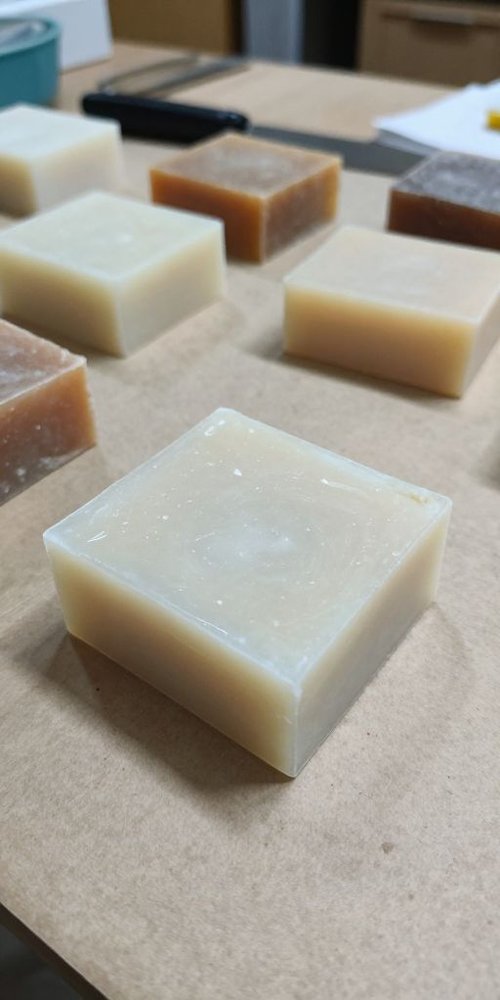
I started with a phone photo of several handmade soap bars on a craft table. The soap is visible, but the photo still feels like a work-in-progress shot. The background includes table clutter and uneven lighting, and the scene does not yet suggest scent, handmade packaging, or giftability.
For the final handmade soap marketing image, I used these Marketing Image settings:
- Include People: No
- Style: Rustic / Handmade
- Aspect Ratio: Pinterest Pin (2:3)
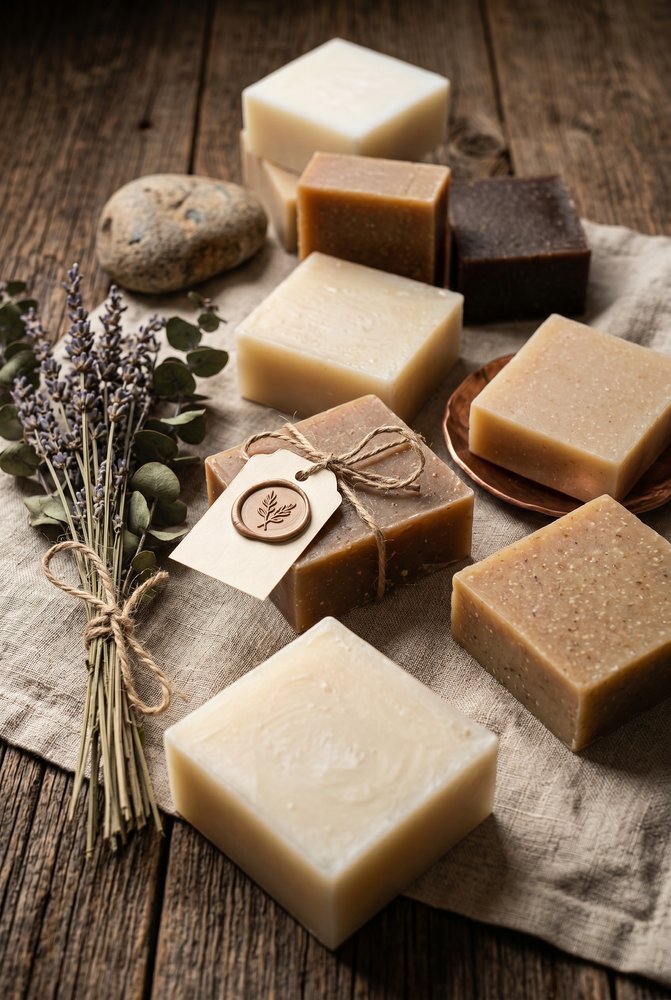
The result keeps the handmade soap as the subject, then stages the bars with linen, wood, dried lavender, eucalyptus, a small tag, twine, and warm rustic lighting.
Craft table soap photo
Rustic Etsy-ready image
What changed in the final image
The biggest win is intent. The original image looks like the soap was photographed where it happened to be sitting. The final image looks like the soap was styled for a handmade shop.
The second win is sensory context. Dried lavender, eucalyptus, linen, twine, and warm wood all support the product without covering it up. They give the viewer a quick idea of natural ingredients, scent, and handmade care.
The third win is format. A vertical 2:3 composition can work well for Pinterest-style discovery, tall social graphics, and product storytelling. The same soap photo could also be rerun in other formats:
- Square (1:1) for simple product cards or social posts
- Product Card (3:4) for a tighter ecommerce grid image
- Instagram Post (4:5) for feed-friendly product announcements
- Wide Banner (4:1) for shop updates, emails, or collection headers
That is the useful part of starting from your real product. One clear soap reference can become multiple images for different channels.
Input photo tips for handmade soap
You do not need a perfect studio shot before using ImageFix, but the input photo still matters.
Keep the soap in focus. Texture is one of the biggest selling points for handmade soap. Make sure the edges, swirls, speckles, and surface details are sharp enough to read.
Show the full bar shape. Avoid cropping off corners unless you are intentionally making a close-up detail shot. A full bar gives the blueprint more structure to preserve.
Use natural light when possible. Soft window light helps show texture without harsh reflections. If overhead light creates strong shadows or yellow color, move the soap closer to a window.
Photograph each scent or batch separately. If your bars differ by color, swirl, ingredient, or stamp, give each one its own reference image so the final marketing images stay accurate.
Do not hide the handmade details. Small imperfections, botanical flecks, cut edges, and stamped tops can help the product feel real. The goal is polish, not a plastic-looking soap block.
When to use Rustic / Handmade
Rustic / Handmade is a strong choice when the product is meant to feel natural, small-batch, and giftable. It works well for soap, candles, ceramics, linen goods, leather goods, paper goods, and other items where texture is part of the appeal.
For handmade soap, this style can add the supporting cues that sellers often struggle to capture quickly: linen, warm wood, dried botanicals, twine, simple tags, and a quiet maker-market feel.
Clean Studio is better when you want a simpler catalog image with fewer props. Nature / Botanical is better when the ingredients are the main story. Luxury / Premium can work if the soap brand is positioned more like spa skincare than craft-market goods.
The point is not to pick one look forever. Upload the same soap photo, run the Marketing Image blueprint with a different style or aspect ratio, and compare which image fits the listing, pin, email, or product card.
Step-by-step: Create handmade soap photos
Here is the exact workflow I used to turn the craft-table photo into a rustic soap marketing image.
Step 1: Upload your soap photo
- Log into ImageFix.
- Upload the handmade soap photo you want to improve.
- Open the image in the editor after it finishes uploading.
For this example, I used a phone photo of handmade soap bars on a work surface. The soap is clear enough to identify, but the surrounding table and background do not help sell the product.
Step 2: Select the Marketing Image blueprint
- In the left sidebar, choose Marketing Image.
- Check that the soap photo is selected on the canvas.
- Review the options panel on the right side of the editor.
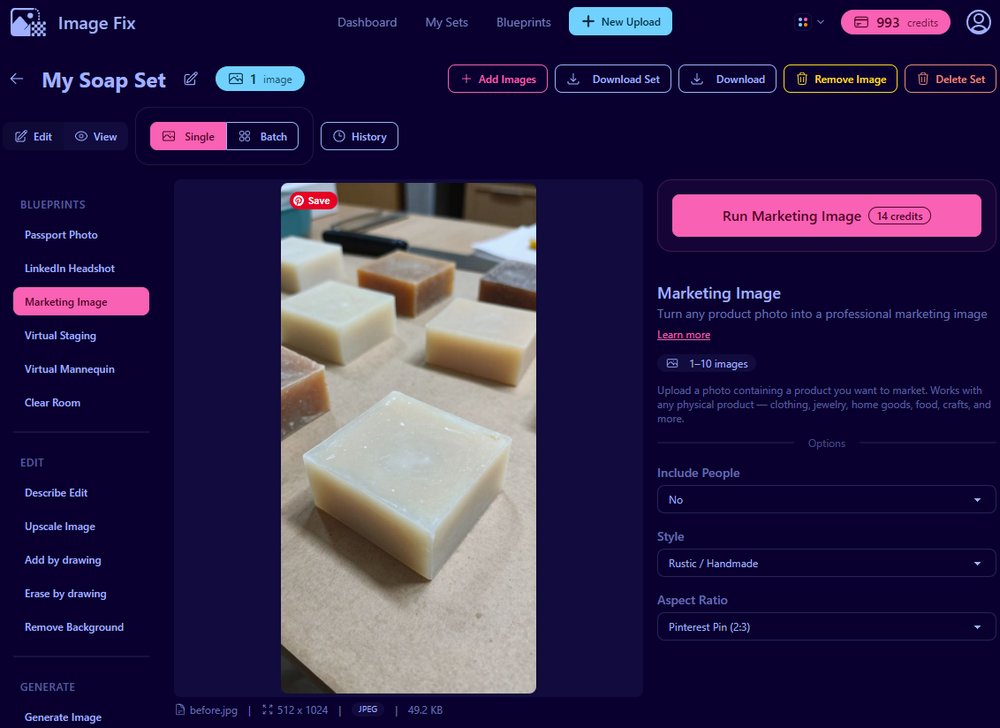
The Marketing Image blueprint is built for physical products: handmade soap, candles, jewelry, food packaging, skincare, home goods, apparel, and similar ecommerce items.
Step 3: Set Include People to No
- Find the Include People dropdown.
- Choose No for a product-only soap image.
- Use Yes only when a person is already part of the product photo and you want them kept in the scene.
This example is just the soap, so No is the right choice. It keeps the generated result focused on the product instead of adding a hand, model, or lifestyle subject.
Step 4: Choose Rustic / Handmade
- Open the Style dropdown.
- Select Rustic / Handmade.
- Use this style when you want natural textures and handmade styling.
Rustic / Handmade works especially well for products that benefit from warmth and material detail. For this soap image, it created a wood surface, linen cloth, dried botanicals, a gift tag, and a calmer product composition.
Step 5: Choose Pinterest Pin 2:3
- Open the Aspect Ratio dropdown.
- Select Pinterest Pin (2:3).
- Use this when you want a vertical product image for discovery-focused channels.
A 2:3 crop gives handmade soap room to sit inside a taller composition. That extra height is useful when you want the scene to include texture, scent cues, and gift styling without pushing the product out of the frame.
Step 6: Run the blueprint
- Click Run Marketing Image.
- Wait for ImageFix to generate the new image.
- Review the result on the canvas.
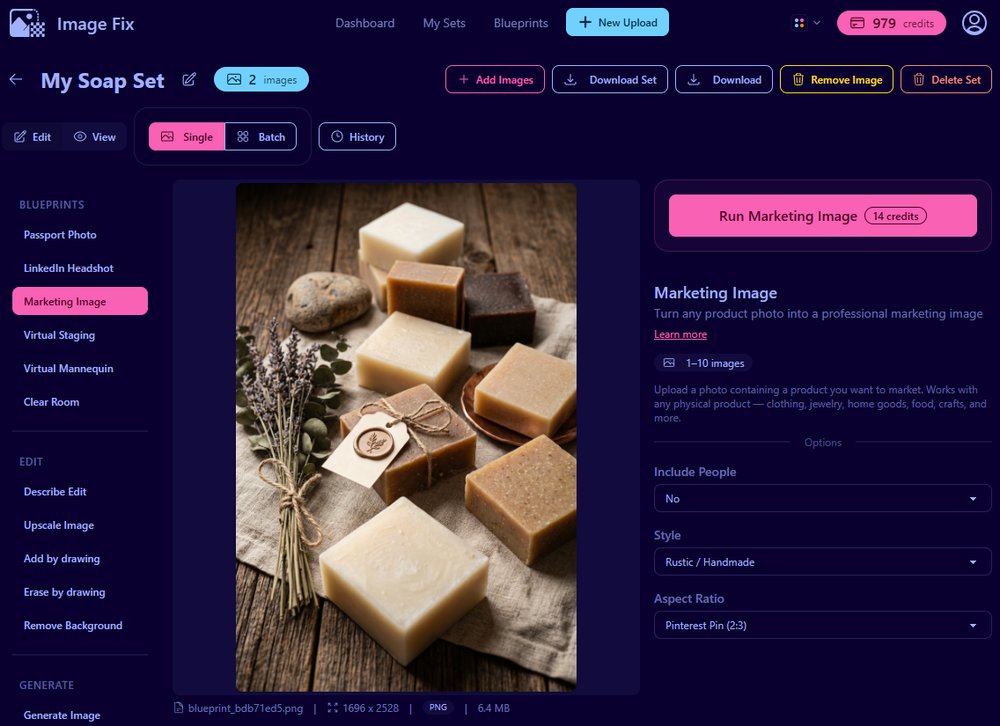
The final image keeps the same handmade soap category and turns the work-table photo into a more intentional rustic product scene.
Tips for better soap product photos
Make one clean reference before you style heavily. A simple, clear product photo gives ImageFix the best starting point. The staged look can come later.
Keep scent cues believable. Lavender, eucalyptus, citrus peel, oats, honey dippers, clay bowls, and linen can all work, but choose props that match the actual scent or brand story.
Use consistent angles across a collection. If every scent is photographed from a different distance and angle, the shop can feel inconsistent. Try one front-facing reference and one angled reference for each batch.
Check the final image for product accuracy. Make sure the shape, color family, texture, and number of bars still match what you want to sell.
Rerun the same product for different channels. Use Pinterest Pin 2:3 for visual discovery, Product Card 3:4 for a shop grid, and Square 1:1 for general social posts.
Why ImageFix
- It starts from your real product. You do not need to prompt a fake soap bar from scratch.
- The options are simple. Pick people, style, and aspect ratio, then run the blueprint.
- It fits handmade seller workflows. You can create soap marketing images for listings, pins, social posts, and seasonal launches from the same source photo.
Ready to upgrade your handmade soap photos?
Try the Marketing Image blueprint with one of your own soap photos, or create a free ImageFix account and get 50 free credits to test it on a few handmade product images.