How to Fix Candle Product Photos: Transform Images Fast
Learn how to fix candle product photos for Etsy, Amazon, and online stores. Transform amateur shots into professional marketing images with AI tools.
You spent hours hand-pouring that oatmeal and honey candle. The fragrance is perfect. The wicks are centered. The label looks great. Then you snap a photo on your cluttered crafting table and… it looks like a garage sale find.
Bad candle product photography is killing your sales. That’s the hard truth. Your candle is beautiful, but if your listing photos show dim lighting, messy backgrounds, and zero lifestyle context, browsers scroll right past.
If you’re selling candles on Etsy, Amazon, Shopify, or Pinterest, you need professional-looking images without the professional photographer price tag. And you need them fast.
Why candle marketing images make or break your shop
Candles are weirdly hard to photograph well. Here’s why:
They’re small but need to look substantial. A 3-wick tumbler photographed on a white background looks like a sample size. Buyers want to see the candle in context so they can imagine it in their own space.
Lighting is a nightmare. Lit candles have glow. Unlit candles don’t. Neither looks right with a phone flash bouncing off the glass. And those “warm ambient” shots? They either look orange or dark, rarely both.
Scents can’t be photographed. You can’t capture “oatmeal and honey” in pixels, so your image has to do emotional heavy lifting. The photo needs to make people feel cozy before they ever light the wick.
Platforms demand different formats. Etsy wants square. Pinterest wants tall. Amazon has strict white-background rules for the main image but lifestyle shots sell better in search results. You end up needing multiple versions of every product photo.
When your candle photos look amateur, buyers assume your candles are amateur. Fair or not, that’s the psychology.
The old options (and why they’re a pain)
Hire a product photographer: You’ll pay $200-500 per session, and you still have to ship products, wait for edits, and schedule reshoots when you launch new scents.
Build a home studio: Backdrop stands, ring lights, reflectors, foam boards. You’re out $300 and now you have to learn lighting. Also, where do you store all that stuff?
DIY with Photoshop/Canva: Sure, if you enjoy masking out wicks and glass reflections for hours. Background removal on transparent objects like glass is its own special hell.
Use your phone and hope: This is what most candle makers do. The results are… inconsistent.
There’s a better way.
What you’ll make
In this tutorial, you’ll transform a messy table snapshot into a professional marketing image that:
- Shows your candle in a beautiful lifestyle setting
- Matches the vibe of your brand (cozy, luxury, rustic, minimal - you pick)
- Fits the aspect ratio for whatever platform you’re targeting
- Actually looks like you hired a photographer
One click. That’s it.
Want a different style for Instagram versus Pinterest? Run it again with a different setting. The same candle, infinitely many marketing-ready images.
Before and after: candle photo transformation
Here’s what happens when you take a quick phone photo and let AI handle the heavy lifting.
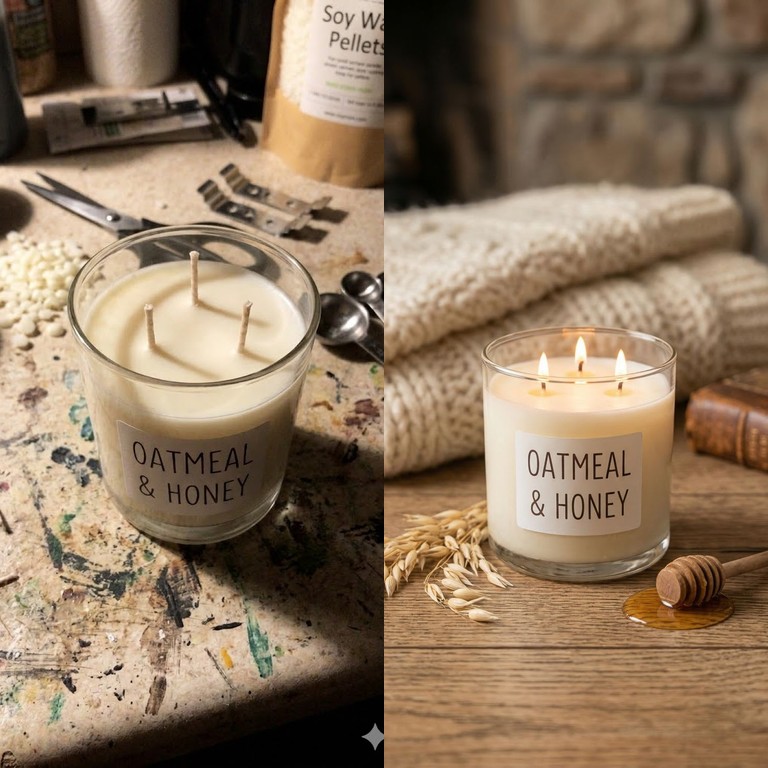
Messy table to cozy lifestyle
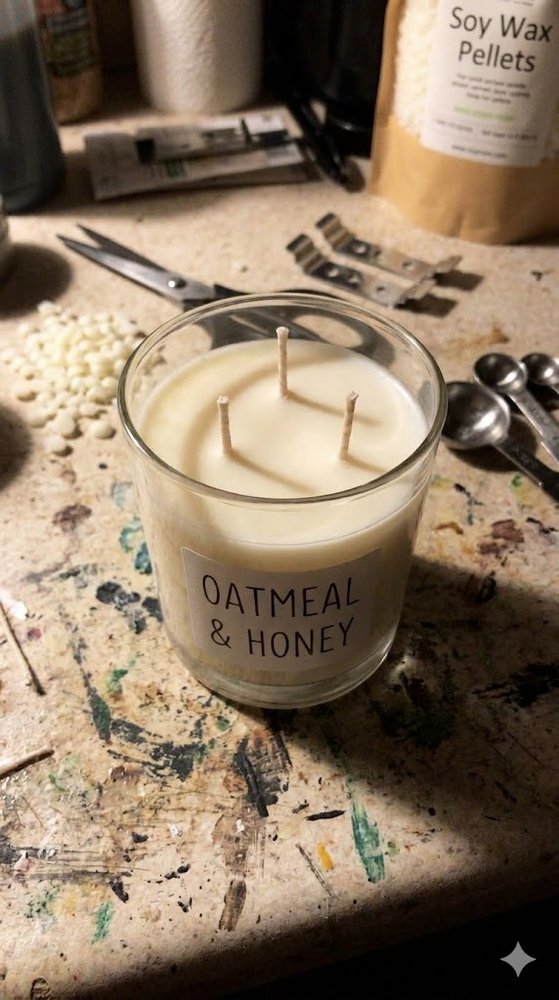

Same exact candle. Same glass tumbler. Same label. But the after image tells a story. It shows a lifestyle. It makes you want to curl up with a blanket and light that thing immediately.
The secret: Marketing Image blueprints in ImageFix
ImageFix uses AI blueprints designed specifically for product sellers. The Marketing Image blueprint takes your amateur product shot and generates a professional marketing image with proper styling, lighting, and context.
Here’s what makes it work for candle sellers:
Style presets built for products: Choose from “Cozy / Warm” (perfect for candles), “Luxury / Premium” (for high-end lines), “Rustic / Handmade” (for farmhouse vibes), “Clean Studio” (for Amazon compliance), and more. The AI knows what each style looks like.
Aspect ratios for every platform: Square for Instagram, tall for Pinterest, 4:5 for posts, 16:9 for YouTube thumbnails. One image, reformatted for wherever you sell.
Smart product preservation: The AI identifies your actual product and keeps it identical in the output. Your label, your glass, your wax color - all preserved. It only changes the context around them.
Optional people handling: Some listings show a hand holding the candle. Some don’t. Toggle this setting based on your preference.
You’re not editing pixels. You’re not removing backgrounds manually. You’re just telling the AI what vibe you want, and it builds the whole scene.
Why candle sellers are switching to AI photo editing
Traditional product photography was built for brands with budgets. Small makers got by with phone cameras and hope.
AI changes the math:
- Speed: Generate a professional marketing image in under a minute
- Cost: A few credits per image versus hundreds per photoshoot
- Flexibility: Change styles seasonally without new photos
- Consistency: Your whole catalog matches, even if you shot the photos months apart
- Platform agility: Reformat for new platforms instantly
The candle makers winning on Etsy and Amazon aren’t necessarily making better candles. They’re presenting them better. And now that barrier is gone.
Step-by-step: How to Transform Your Candle Photos into Professional Marketing Images
Here’s exactly how I turned a messy cell phone photo into a scroll-stopping marketing image in under a minute.
Step 1: Upload your candle photo
- Log into ImageFix and head to your dashboard
- Click “Upload” and select your candle photo
- Wait for the image to process - you’ll see it appear in your library
I’m working with a photo of a hand-poured 3-wick candle in a glass tumbler. The candle itself is gorgeous - it has an “Oatmeal & Honey” label and looks professionally made. But I snapped the photo on my cluttered work table with my phone, and it shows. Messy background, harsh lighting, zero Pinterest appeal.
That’s exactly the kind of problem ImageFix is built to solve.
Step 2: Select the Marketing Image blueprint
- Click on your uploaded image to open the editor
- On the left sidebar, find and select “Marketing Image” from the blueprint options
- You’ll see the options panel appear on the right side of your screen
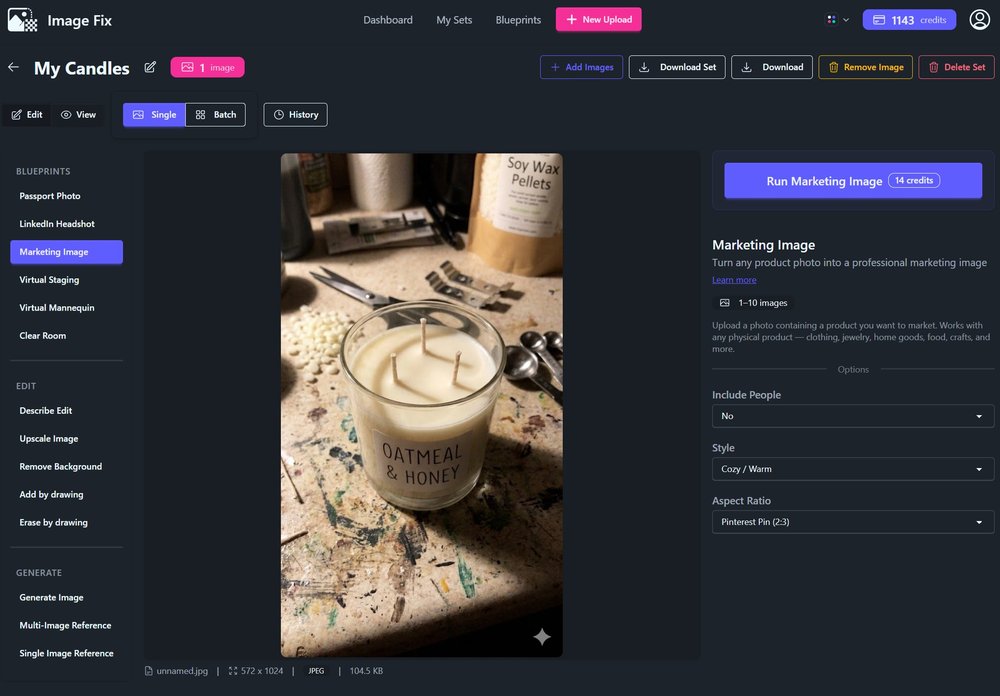
The Marketing Image blueprint is designed specifically for turning amateur product shots into professional-grade marketing content. It’s perfect for candles, jewelry, crafts - pretty much anything you’d sell on Etsy or Amazon.
Step 3: Choose whether to include people
- Look for the “Include People” dropdown in the options panel
- Select “Yes” if your photo shows someone holding or showcasing your candle
- Select “No” if your image is just the product by itself
For my candle photo, there’s no one in the shot - it’s just the candle sitting on a table. So I picked “No.” This tells the AI to focus entirely on the product without adding any human elements.
If you’re selling wearable items or products that benefit from being shown in use, “Yes” keeps the person in frame while still transforming the scene around them.
Step 4: Pick your style
- Find the “Style” dropdown in the options panel
- Browse through the available options - there are 17 different styles
- Select the one that matches your brand aesthetic
I went with “Cozy / Warm” because my candle is an oatmeal and honey scent. That earthy, inviting vibe fits perfectly with what the product is all about. But you’ve got options:
- Clean Studio - Crisp white backgrounds, professional catalog feel
- Rustic / Handmade - Perfect for artisan products and crafts
- Luxury / Premium - High-end aesthetic for premium pricing
- Dark & Moody - Dramatic shadows and rich tones
- Nature / Botanical - Natural elements and greenery
- Magazine Editorial - Like something from a lifestyle magazine
Pick what feels right for your brand. You can always run the blueprint again with a different style if the first result isn’t quite what you wanted.
Step 5: Select your aspect ratio
- Find the “Aspect Ratio” dropdown
- Choose the ratio that matches where you’ll post the image
I’m planning to pin this image, so I selected “Pinterest Pin (2:3)” - that’s the vertical format that dominates Pinterest feeds. But you’ve got choices for every platform:
- Square (1:1) - Instagram posts, general use
- Instagram Post (4:5) - Maximum Instagram feed presence
- TikTok / Story (9:16) - Vertical video and story formats
- YouTube Thumbnail (16:9) - Standard widescreen
- Product Card (3:4) - Great for product listings
Think about where this image will live before you pick. The right aspect ratio means no cropping later and your image looks native to the platform.
Step 6: Generate your marketing image
- Click the “Run Marketing Image” button at the bottom of the options panel
- Wait about 30-60 seconds while the AI works its magic
- Your transformed image will appear in the editor
That’s it. One click.
The result? My exact same candle is now sitting on a gorgeous wooden table with all three wicks lit. There’s a scattering of wheat grains, a honey wand dripping with golden honey, and in the blurred background - a white woolen blanket and an old book. The AI absolutely nailed the “Cozy / Warm” vibe I was going for.
What took me 30 seconds with ImageFix would have required a light tent, props, proper lighting, and probably an hour of staging and photography. Or hiring a professional product photographer and waiting days for results.
Tips for Better Candle Product Photos
Photograph your candles unlit AND lit. The Marketing Image blueprint works with either, but if you want those beautiful flickering flames in your final image, a lit photo gives the AI better reference material to work with.
Don’t worry about your background. Seriously. The AI is designed to handle messy tables, cluttered countertops, and less-than-ideal lighting. Focus on getting your candle in focus and reasonably well-lit, and let ImageFix handle the rest.
Try multiple styles. I ran my candle through “Rustic / Handmade” and “Dark & Moody” too, just to see the options. Each one gave me a completely different vibe - useful if you’re A/B testing product images or want variety across your social channels.
Why ImageFix for Candle Photography
- No photography skills required. Upload your cell phone photo and get professional results. No light boxes, no reflectors, no Photoshop knowledge.
- Instant results. Get your marketing image in under a minute, not days. Perfect for sellers who need to list products fast.
- Platform-perfect sizing. Built-in aspect ratios for every major platform mean your image is ready to post with no cropping or resizing needed.
Ready to Transform Your Candle Photos?
Get 50 free credits when you sign up for ImageFix. That’s enough for several marketing images - more than enough to see the difference professional product photography makes for your shop.
Create Your Free Account and start turning your amateur candle photos into scroll-stopping marketing images today.