How to Fix Jewelry Product Photos: Transform Images Fast
Learn how to fix jewelry product photos for Etsy, Amazon, and online stores. Transform amateur shots into professional marketing images with AI tools.
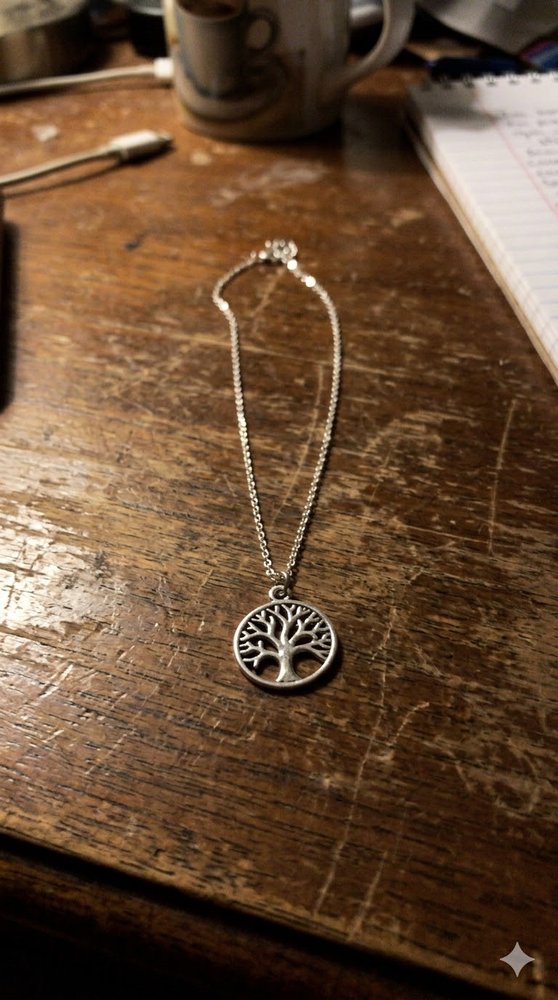
You’ve got a gorgeous handmade necklace. You snapped a quick photo with your phone, probably on your kitchen table or a random piece of fabric. And now you’re looking at that image thinking… this doesn’t look like something anyone would buy.
That’s the jewelry product photography problem in a nutshell. Your piece is beautiful. Your photo is not.
If you’re selling on Etsy, Amazon, Shopify, or any online marketplace, you already know the deal. Great jewelry photos sell. Bad ones don’t. And most of us don’t have a light tent, professional lighting rig, or a spare room to turn into a studio.
In this tutorial, I’ll show you how to fix jewelry product photos fast - transforming amateur smartphone shots into professional marketing images that actually look like they belong in a store.
Why jewelry photos for online selling matter more than you think
Here’s the thing about selling jewelry online: your customer can’t touch it. They can’t try it on. They can’t see how the light hits the metal. All they have is your photo.
And when that photo looks like you took it on your messy desk at 10pm? They’re clicking away.
Professional jewelry marketing images do three things:
- They build trust (this seller takes their business seriously)
- They show detail (texture, shine, craftsmanship)
- They fit the platform (square for Instagram, tall for Etsy listings, specific ratios for Amazon)
I’ve seen sellers with genuinely stunning work struggle because their photos made their pieces look cheap. And I’ve watched mediocre products fly off virtual shelves because the photos looked like they came from a high-end boutique.
The gap isn’t talent. It’s presentation.
The old options (and why they’re a headache)
You can absolutely get professional jewelry photos the traditional way. Here’s what that looks like:
Hire a product photographer: Great results, but you’ll pay $50-200+ per piece. And if you’re making one-of-a-kind items or constantly adding new inventory, that adds up fast.
Build a light tent setup: A small softbox, some LED panels, a white backdrop. Cheaper than a pro, but now you’re storing equipment, learning lighting angles, and spending hours per shoot.
Learn Photoshop: Sure, if you want to spend your weekends watching masking tutorials and fighting with reflections on metallic surfaces.
None of these are wrong. They’re just slow. And when you’re running a small business, slow means lost sales.
There’s a faster way.
What you’ll make in this tutorial
By the end of this post, you’ll have a jewelry photo that:
- Features your piece on a professional-looking background (not your kitchen table)
- Uses a luxury style that makes metal and gemstones look premium
- Is formatted with the right aspect ratio for your selling platform
- Took you about 60 seconds to create
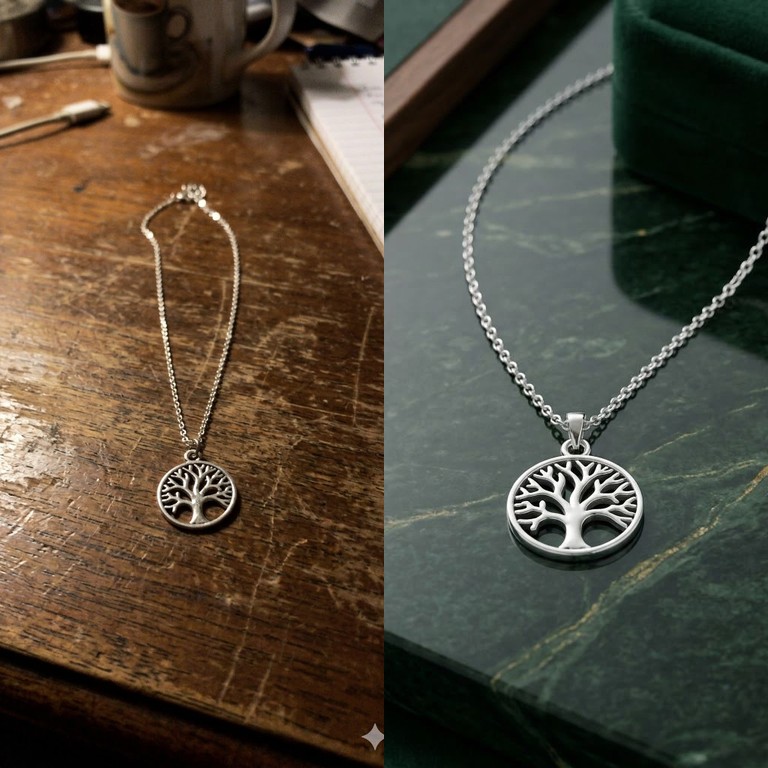
The example I’ll walk through uses a silver necklace with a tree emblem. The before shot? Taken on a wooden table with a phone. The after? It looks like it belongs in a jewelry catalog.
Before and after: jewelry photo transformation
Here’s what the transformation looks like. Same necklace. Same lighting. Completely different vibe.
Silver Tree Necklace
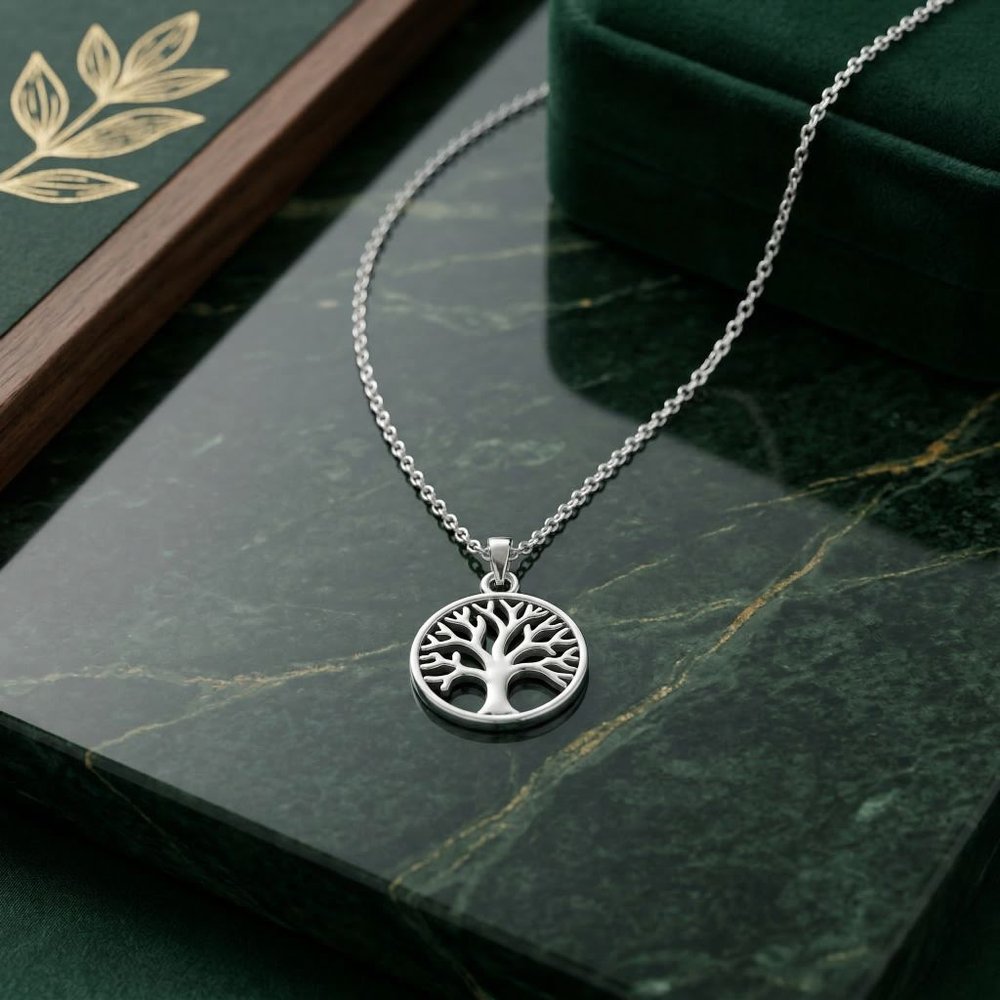
The original shot isn’t terrible. The necklace is in focus, the lighting is decent. But that wooden table background? It screams “homemade.” And when someone’s scrolling through Etsy at midnight, “homemade” doesn’t catch their eye the way “luxury” does.
The secret: AI-powered background replacement for jewelry
Here’s what’s happening in that transformation. I used ImageFix’s Marketing Image blueprint - a tool built specifically for product sellers who need to turn casual photos into polished listing images.
What it does:
- Removes your existing background automatically
- Places your jewelry on a styled background that matches your aesthetic
- Preserves every detail of your piece (no weird artifacts on chains or prongs)
- Lets you pick from preset styles like Luxury, Minimal, Natural, and more
And the whole thing takes about as long as it takes to brew coffee.
Tips for better jewelry photo editing results
The Marketing Image blueprint does most of the heavy lifting, but your input photo still matters. Here’s how to get the best results:
1) Get the lighting somewhere close
You don’t need studio lights. A window with natural daylight works great. Just avoid:
- Harsh overhead lights that create weird shadows
- Mixed lighting (warm bulbs + cool daylight)
- Super dark photos where details get lost
2) Keep the background simple (before you edit)
The AI will remove it anyway, but a cleaner starting background helps. A plain piece of paper, a solid-color cloth, or even a clear patch of table works better than a busy patterned surface.
3) Your phone is fine
Seriously. Modern smartphones take excellent product photos. You don’t need a DSLR. What you need is:
- Steady hands (or prop your phone on something)
- Decent light
- A clear shot of the jewelry
The rest is post-processing.
4) Match the style to your brand
If you’re selling bohemian handmade pieces, the Luxury/Premium style might feel too corporate. Natural or Rustic might fit better. The point is: pick a style and use it consistently across your shop.
Consistency is what makes a shop look professional, even if every photo was taken on your phone.
Why ImageFix is built for ecommerce jewelry photos
Most photo editors are built for portraits, landscapes, or general use. ImageFix is built specifically for sellers who need product photos that convert.
Marketing Image blueprint: One-click transformation from amateur to professional Multiple style options: Luxury, Minimal, Natural, and more - so your photos match your brand Aspect ratio presets: Square for Instagram, 4:5 for Etsy, whatever you need Credit-based pricing: Pay for what you use, no subscription required
And the best part? You don’t need to learn Photoshop. You don’t need to understand masking. You just upload, pick a style, and download your polished image.
Ready to fix your jewelry product photos?
If your listings are stuck with photos that look like they were taken in your garage, it’s time for an upgrade.
Try ImageFix free - 50 free credits, no credit card required. Upload your jewelry photo, pick a style, and see the difference a professional background makes.
Step-by-step: How to Fix Your Jewelry Product Photos
Here’s exactly how I transform my amateur jewelry photos into professional marketing images using ImageFix.
Step 1: Upload your jewelry photo
- Go to ImageFix and sign in to your account
- Click the upload button and select your jewelry photo
- Wait for the image to upload and appear in the editor
I’m starting with a photo of a silver necklace with a tree emblem that I took with my phone. It’s laid across my dining room table with random stuff in the background. Not exactly professional looking.
The good news? That’s exactly the kind of photo ImageFix is designed to fix.
Step 2: Select the Marketing Image blueprint
- Look at the left sidebar in the editor
- Find and click on “Marketing Image” from the blueprint options
- You’ll see the options panel appear on the right side
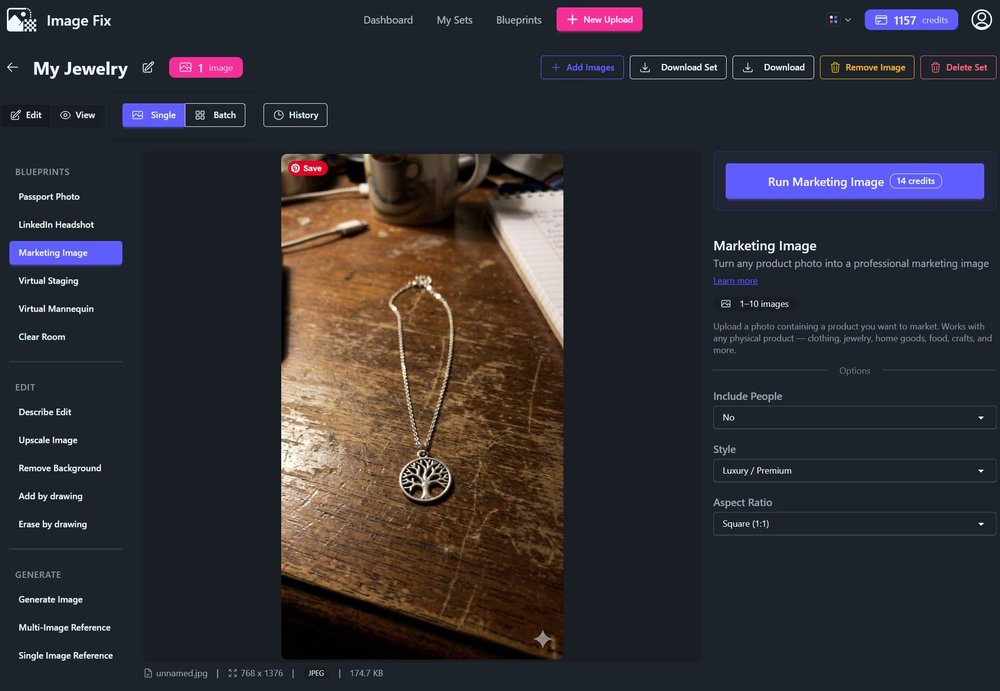
The Marketing Image blueprint is my go-to for product photos. It’s designed specifically to take amateur shots and turn them into something you’d see on a professional e-commerce site.
Step 3: Choose whether to include people
- Look for the “Include People” option in the right panel
- Select “Yes” if your photo shows someone wearing or holding the jewelry
- Select “No” if it’s just the jewelry by itself
For my necklace photo, I chose “No” since it’s just the piece lying on a table. If you’ve got a photo of someone modeling your jewelry, definitely keep the people in - it adds life to the image.
Step 4: Pick your style
- Click on the “Style” dropdown menu
- Browse through the available styles like:
- Clean Studio
- Flat Lay
- Lifestyle
- Luxury / Premium
- Modern Minimalist
- Nature / Botanical
- Select the one that matches your brand aesthetic
I went with “Luxury / Premium” for the necklace because it’s a higher-end piece. The AI will create a sophisticated backdrop that makes the jewelry look expensive. If you’re selling handmade or rustic pieces, the “Rustic / Handmade” style might be a better fit.
Step 5: Select your aspect ratio
- Click on the “Aspect Ratio” dropdown
- Choose the ratio that fits where you’ll use the image:
- Square (1:1) - Great for Instagram posts and most marketplaces
- Instagram Post (4:5) - Optimized for Instagram feed
- Pinterest Pin (2:3) - Perfect for Pinterest
- Product Card (3:4) - Works well for product listings
- TikTok / Story (9:16) - Vertical format for stories
I picked “Square (1:1)” because it works everywhere - Etsy listings, Instagram posts, you name it. Square is the safe bet when you’re not sure.
Step 6: Generate your marketing image
- Click the “Run Marketing Image” button
- Wait about 30-60 seconds for the AI to work its magic
- Your transformed image will appear in the editor
The result? My necklace is now displayed on a gorgeous block of jade marble. Same exact jewelry, completely different vibe. The background is clean and professional, and the whole image looks like it was shot in a studio.
Tips for Better Jewelry Photos
Lighting matters - Even though ImageFix can salvage dark photos, starting with decent lighting helps the AI see your jewelry’s details better. Natural daylight near a window works great.
Keep your product clean - Wipe down your jewelry before shooting. Smudges and fingerprints are harder to fix in post than you’d think.
Multiple angles - Upload several shots of the same piece from different angles. This gives you options when you’re creating listings.
Why ImageFix for Jewelry Photos?
- Save money on photography - Professional jewelry photography can cost $20-50 per image. ImageFix does it for a fraction of that.
- No equipment needed - Your phone camera is all you need. No light boxes, no expensive lenses.
- Unlimited variations - Try different styles and backgrounds until you find what sells best for your brand.
Ready to transform your jewelry photos? Sign up for ImageFix and get 50 free credits to start creating professional product images today.