Pet Product Photos for Instagram and Shopify with AI
Create cozy pet product photography for Instagram and Shopify with AI. Turn a simple dog treat bag photo into a warm, professional marketing image.
Pet products have to look fun, useful, and trustworthy in the same photo. That is especially true for dog treats. A buyer wants to know the bag looks real, the brand feels clean, and the product belongs in a home they would feel good buying for their own dog.
A quick phone photo can show the treat bag clearly, but it often does not do enough selling. The floor, table, shadows, and household clutter can make a good product feel less polished than it is.
For this example, I used the ImageFix Marketing Image blueprint to turn one everyday photo of a Cozy Pup Treat Co. bag into a warmer marketing image for Instagram and Shopify. The goal is not to invent a different product. The goal is to keep the same dog treat packaging and make the scene feel more intentional.
Why pet product photography matters
Pet shoppers make quick trust decisions. They are looking at the product, but they are also reading the mood around it: clean home, happy routine, approachable brand, and packaging that feels safe enough to buy.
That is why pet product photos can be tricky. Too plain, and the image feels like a catalog placeholder. Too busy, and the product gets lost behind props, paws, toys, bowls, or blankets.
Good pet product photography does three jobs:
- It keeps the product and label easy to recognize.
- It adds enough context to show how the product fits into daily pet care.
- It gives the brand a personality without making the image look chaotic.
For this post, I chose an Instagram Post 4:5 image because dog treats and pet accessories often need a feed-friendly vertical crop. A 4:5 composition gives the product more height than a square post while still working naturally on social feeds and many Shopify content blocks.
The old way: styling dog treat photos
Traditional pet product photography takes more setup than it sounds like:
- A clean surface that feels warm, not sterile
- Soft light that does not glare on the treat bag
- Props like a bowl, leash, blanket, toy, or treat crumbs
- Careful framing so the packaging stays readable
- A pet that cooperates long enough to add context without blocking the product
- Editing time for color, dust, shadows, and crop
That can work for a full campaign shoot. It is harder when you need new images for product pages, Instagram posts, seasonal promos, bundle offers, and email graphics.
AI product photography helps because you can start with a clear reference photo of your actual product, then let the scene become more polished after the product is visible. You still need a usable input photo. You do not need to stage a whole pet-friendly room every time.
What I made
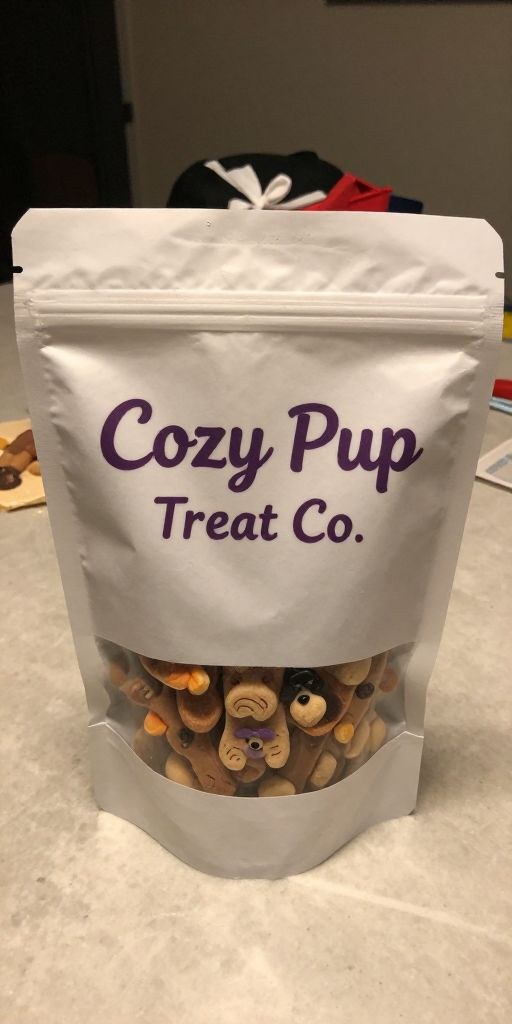
I started with a casual phone photo of a Cozy Pup Treat Co. dog treat bag on a countertop. The product is centered and readable, but the original photo still shows uneven indoor lighting and distracting background clutter behind the bag.
For the final pet product marketing image, I used these Marketing Image settings:
- Include People: No
- Style: Cozy / Warm
- Aspect Ratio: Instagram Post (4:5)
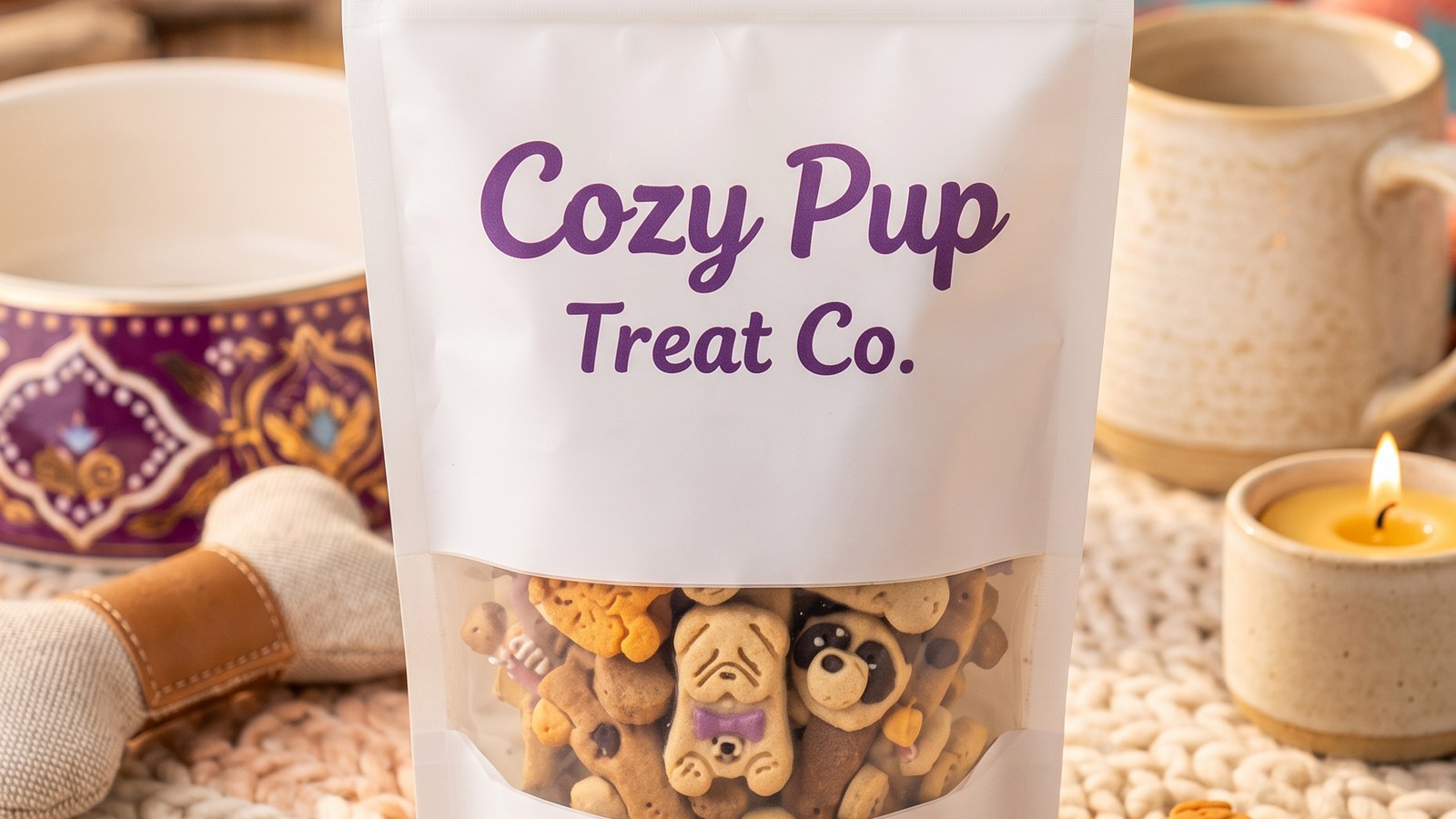
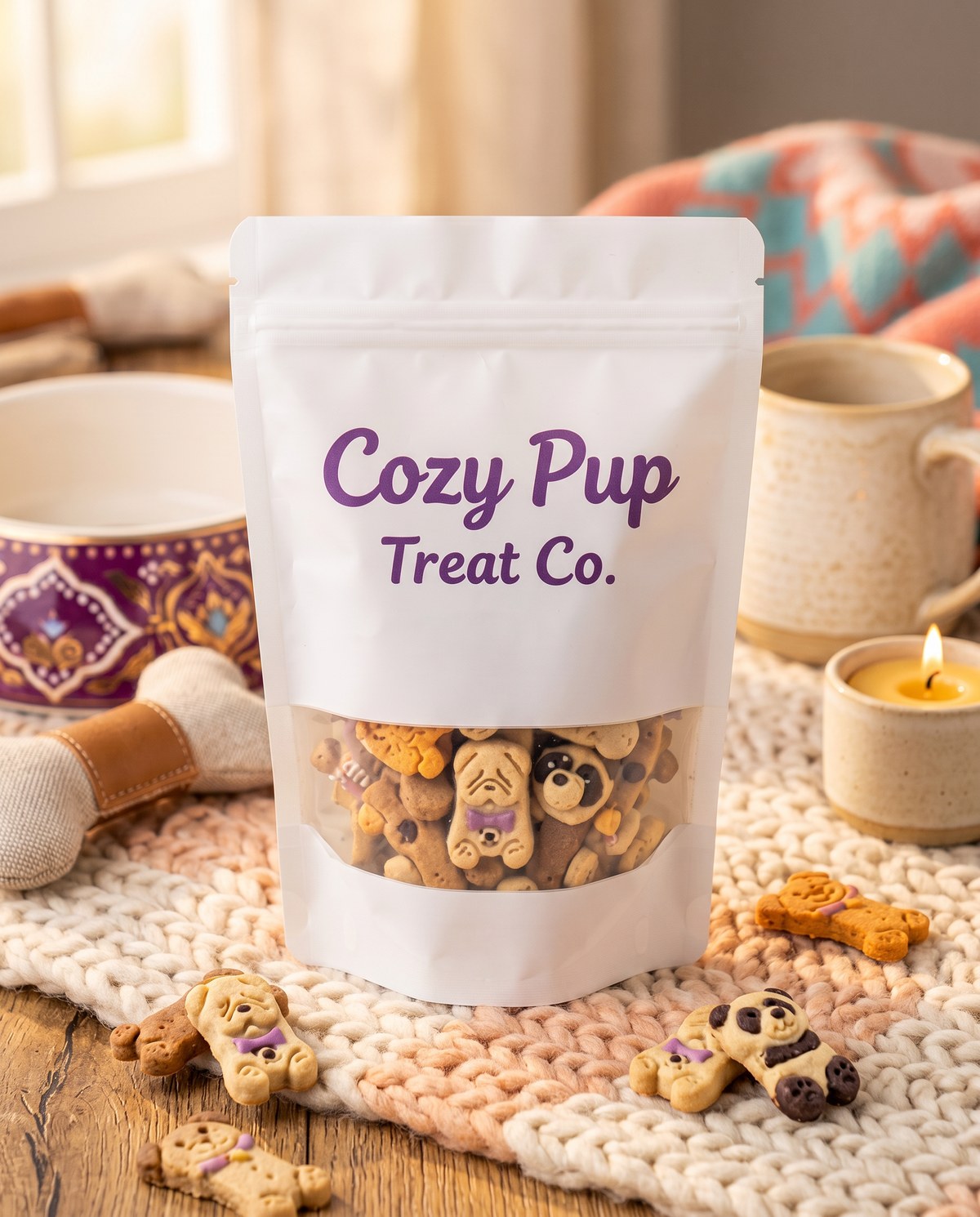
The result keeps the same treat bag as the subject, then places it in a warmer pet-friendly scene with a chunky knit blanket, ceramic bowls, a mug, a small candle, scattered dog-shaped treats, and enough breathing room for an Instagram or Shopify marketing image.
Countertop dog treat photo
Cozy pet brand image
What changed in the final image
The biggest win is trust. The original dog treat photo shows the product, but the final image makes the brand feel more considered. The warmer scene gives the packaging a better frame without distracting from the Cozy Pup label.
The second win is context. Cozy / Warm works well for dog treats because it suggests an at-home routine: soft textiles, simple pet-adjacent props, warm light, and a feeling of care. The dog-shaped treats around the bag add product context without covering the package.
The third win is format. A 4:5 image gives the dog treat bag a strong vertical presence for Instagram while still being useful in Shopify blog sections, product story blocks, and collection promos.
The same source photo could also be rerun in other formats:
- Square (1:1) for simple product cards and general social posts
- Product Card (3:4) for a tighter ecommerce grid image
- Pinterest Pin (2:3) for discovery-focused pins
- Wide Banner (4:1) for email headers, collection pages, or sale graphics
That is the useful part of starting from a real product photo. One dog treat reference can become multiple channel-specific marketing images.
Input photo tips for dog treats
You do not need a perfect studio image before using ImageFix, but the input photo still matters.
Keep the packaging readable. Dog treat bags often rely on flavor, ingredient, size, or benefit claims. If the front of the bag is turned away or washed out by glare, the final image has less to preserve.
Photograph the bag upright. A standing bag usually looks fuller and more professional than a flattened bag on a table. If it will not stand on its own, prop it against something neutral.
Avoid harsh reflections. Glossy treat packaging can catch overhead light. Move near a window, turn the bag slightly, or turn off bright ceiling lights if the label reflects too much.
Use a pet only when it helps. A pet can add scale and emotion, but it should not cover the product. For treat bags, a paw, nose, bowl, or leash can suggest context without taking over the frame.
Shoot each flavor separately. If your brand sells chicken, peanut butter, pumpkin, salmon, or training treats, give each product its own reference image so the final marketing photos stay accurate.
When to use Cozy / Warm
Cozy / Warm is a strong choice when a pet product is connected to home routines, comfort, care, or treat time. It works well for dog treats, pet beds, grooming products, bowls, blankets, calming sprays, and giftable pet accessories.
For dog treats, this style can add the feeling that a plain product shot is usually missing: clean home texture, warm light, soft surfaces, and a calm setting that still lets the packaging lead.
Bright & Colorful is better when the brand is playful, high-energy, or toy-focused. Clean Studio is better when you want a quieter catalog image with fewer props. Lifestyle can work when you want more environmental context.
The point is not to pick one look forever. Upload the same dog treat photo, run the Marketing Image blueprint with a different style or aspect ratio, and compare which image fits the product page, Instagram post, ad, or pin.
Step-by-step: Create dog treat product photos
Here is the exact workflow I used to turn the original dog treat photo into a cozy pet brand image.
Step 1: Upload your dog treat photo
- Log into ImageFix.
- Upload the dog treat product photo you want to improve.
- Open the image in the editor after it finishes uploading.
For this example, I used a phone photo of the Cozy Pup Treat Co. bag on a countertop. The product is clear enough to identify, but the scene does not yet feel styled for a brand post or store page.
Step 2: Select the Marketing Image blueprint
- In the left sidebar, choose Marketing Image.
- Check that the dog treat photo is selected on the canvas.
- Review the options panel on the right side of the editor.
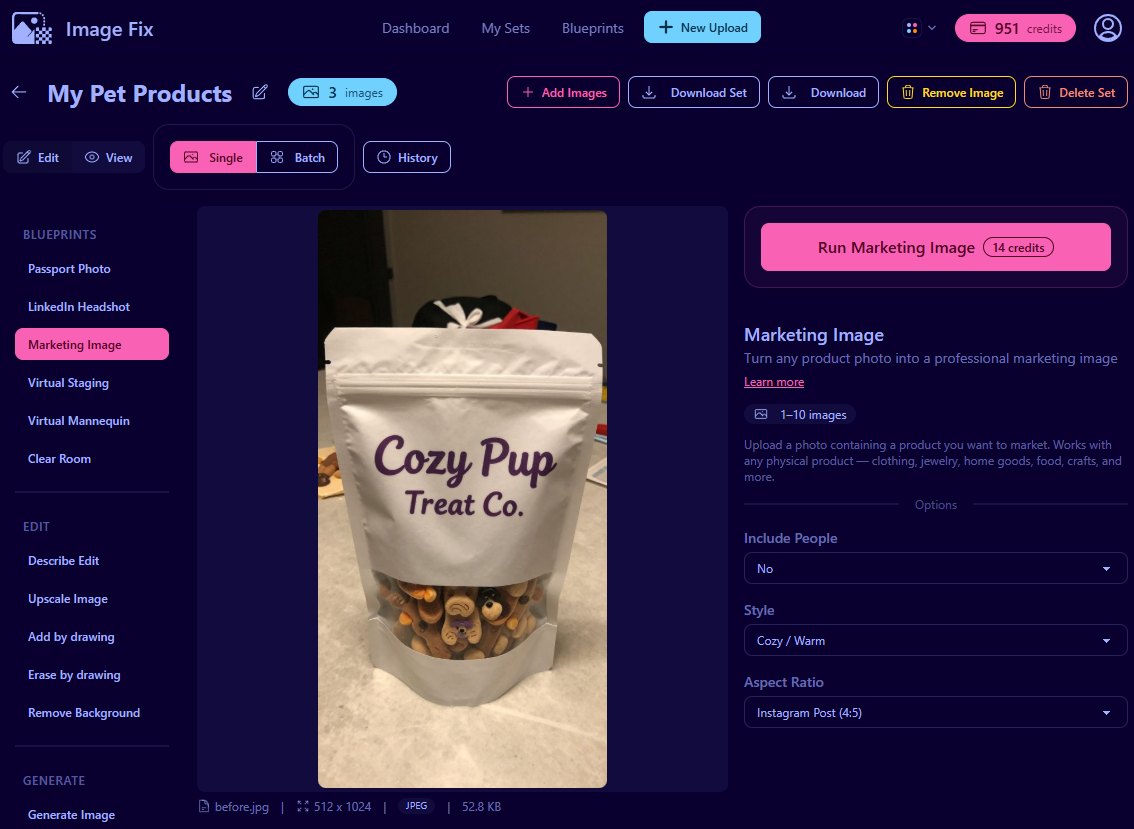
The Marketing Image blueprint is built for physical products: pet treats, toys, grooming products, skincare, candles, jewelry, food packaging, handmade goods, apparel, and similar ecommerce items.
Step 3: Set Include People to No
- Find the Include People dropdown.
- Choose No for a product-only dog treat image.
- Use Yes only when a person is already part of the product photo and you want them kept in the scene.
This example is focused on the treat packaging, so No is the right choice. It keeps the result centered on the product instead of adding a model or hand shot.
Step 4: Choose Cozy / Warm
- Open the Style dropdown.
- Select Cozy / Warm.
- Use this style when you want a comfortable, home-friendly product scene.
Cozy / Warm fits dog treats because treat time is usually an at-home routine. It can create a softer scene with warmer light and simple pet-friendly context while keeping the package as the hero.
Step 5: Choose Instagram Post 4:5
- Open the Aspect Ratio dropdown.
- Select Instagram Post (4:5).
- Use this when you want a vertical product image for feed posts and social promotions.
A 4:5 crop gives the dog treat bag more presence in the frame than a square image. It also leaves room for warm scene details without making the product feel small.
Step 6: Run the blueprint
- Click Run Marketing Image.
- Wait for ImageFix to generate the new image.
- Review the result on the canvas.
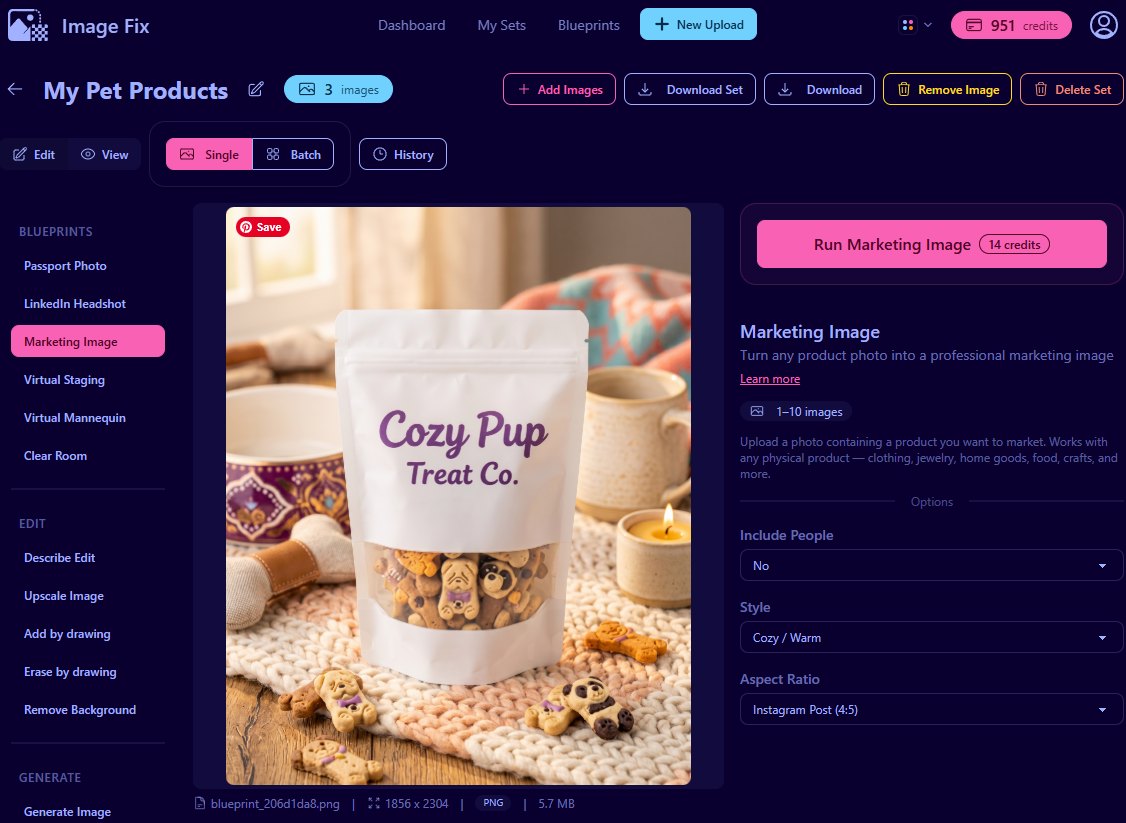
The final image keeps the same dog treat product and turns the casual source photo into a warmer, more intentional pet brand image.
Tips for better pet product photos
Make the product the hero first. Pet props are useful, but they should support the product. Start with one clean product reference before you try busier lifestyle shots.
Match the style to the product. Dog treats, calming products, grooming items, and beds often fit Cozy / Warm. Toys and bright accessories may work better in Bright & Colorful.
Watch scale and cropping. A treat bag should not look tiny beside oversized props. Leave enough space around the product so the final image can crop cleanly.
Check product accuracy. Review the generated image for packaging shape, color family, flavor cues, and label direction before using it in a store or ad.
Rerun the same product for different channels. Use Instagram Post 4:5 for feed content, Product Card 3:4 for ecommerce sections, and Pinterest Pin 2:3 for visual discovery.
Why ImageFix
- It starts from your real product. You do not need to prompt a fake dog treat bag from scratch.
- The options are simple. Pick people, style, and aspect ratio, then run the blueprint.
- It fits seller workflows. You can create pet product marketing images for Shopify, Instagram, Pinterest, email, and launch graphics from the same source photo.
Ready to upgrade your pet product photos?
Try the Marketing Image blueprint with one of your own pet product photos, or create a free ImageFix account and get 50 free credits to test it on a few dog treat, toy, or grooming product images.